cancel
Showing results for 
Search instead for 
Did you mean: 

View all the Fabric Data Days sessions on demand. View schedule

Reply
44Bailey
New Member

Tooltip for whole chart/table etc

Hi,


I'm new to PowerBi and still finding my way around. What I would like to do if possible is to use the tooltip feature to show a pop up on mouse rollover, not for individual data points / bars etc, but for the whole report.


I would like to this this so that I can provide some narrative to the report and the calculation built in to the report.


Is this possible please?


Any advice greatly appreciated.

1 ACCEPTED SOLUTION
kriscoupe
Solution Supplier
Solution Supplier

Hi @44Bailey,


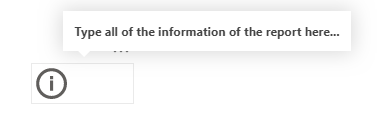
A way you could approach this is to create a new measure what has the text of the info you need.


Capture1.PNG

You can use a button and then set an action to that button as page navigation with none as the page selection. Hit the Fx button next to the tooltip and choose the measure. Then when you hover over this the text is diplayed.


Capture3.PNG


If you need a larger amount of info, another way would be to setup a report page tooltip. This way you can create a new report page with lots of text or whatever you want and use this as a tooltip for hover over. I've supplied a link to show how to do this as this guide is a bit longer.


https://docs.microsoft.com/en-us/power-bi/create-reports/desktop-tooltips


Capture2.PNG

Hope this help


Kris


View solution in original post

2 REPLIES 2
Lalo1980
Regular Visitor

Hi.

I have the following table: 


TipoSolpedTiempoAdicion
Nuevo2010 
OtrosiRQ15 
Proceso2015 
Proceso3015 
Proceso4015 
Proceso5015 
Nuevo3015 

I need, when the value in the column Tipo is "Nuevo", look in the same column on the other rows with the name "Proceso", the row that has the same value that the column "Solped" and then copy the value the column "Tiempo" and put in the column "adicion" in the row "nuevo"

kriscoupe
Solution Supplier
Solution Supplier

Hi @44Bailey,


A way you could approach this is to create a new measure what has the text of the info you need.


Capture1.PNG

You can use a button and then set an action to that button as page navigation with none as the page selection. Hit the Fx button next to the tooltip and choose the measure. Then when you hover over this the text is diplayed.


Capture3.PNG


If you need a larger amount of info, another way would be to setup a report page tooltip. This way you can create a new report page with lots of text or whatever you want and use this as a tooltip for hover over. I've supplied a link to show how to do this as this guide is a bit longer.


https://docs.microsoft.com/en-us/power-bi/create-reports/desktop-tooltips


Capture2.PNG

Hope this help


Kris


Helpful resources

Announcements
November Power BI Update Carousel

Power BI Monthly Update - November 2025

Check out the November 2025 Power BI update to learn about new features.

Fabric Data Days Carousel

Fabric Data Days

Advance your Data & AI career with 50 days of live learning, contests, hands-on challenges, study groups & certifications and more!

FabCon Atlanta 2026 carousel

FabCon Atlanta 2026

Join us at FabCon Atlanta, March 16-20, for the ultimate Fabric, Power BI, AI and SQL community-led event. Save $200 with code FABCOMM.

Top Solution Authors