Join us at FabCon Atlanta from March 16 - 20, 2026, for the ultimate Fabric, Power BI, AI and SQL community-led event. Save $200 with code FABCOMM.
Register now!Vote for your favorite vizzies from the Power BI Dataviz World Championship submissions. Vote now!
Hey everyone,
we have a requirement to make x axis on a bar chart dynamic based on a slicer value.
Lets say slicer has values - "cost per application" and "growth value %". The visual should display either one of these values based on the selection.
Figure 1
This works without any issues.
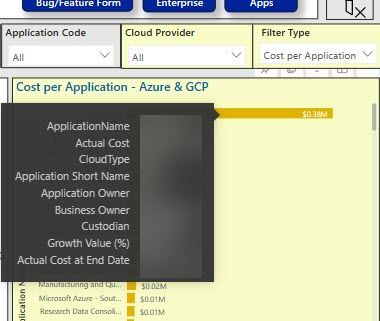
We have an additional requirement to show "growth value (%)" in the tooltip as shown below.
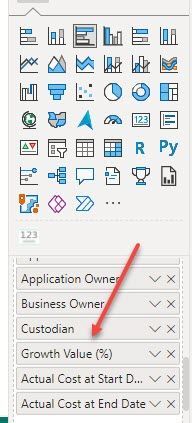
Again, this works fine if we select "cost per application". However, on selecting "growth value(%)", the report starts showing 2 occurrences and on top of the that it doesn't honor the sequence where the tooltip "growth value(%)" was placed.
I believe if we could enforce the tooltip to skip picking up y-axis and x-axis titles, we could be able to achieve the requirement.
Please comment your suggestions/solutions.
Solved! Go to Solution.
That is beyond current functionality. A short term remedy would be to remove the Growth Value (%) tooltip.
If this is important to you please consider voting for an existing idea or raising a new one at https://ideas.fabric.microsoft.com/?forum=2d80fd4a-16cb-4189-896b-e0dac5e08b41
That is beyond current functionality. A short term remedy would be to remove the Growth Value (%) tooltip.
If this is important to you please consider voting for an existing idea or raising a new one at https://ideas.fabric.microsoft.com/?forum=2d80fd4a-16cb-4189-896b-e0dac5e08b41
Vote for your favorite vizzies from the Power BI World Championship submissions!
If you love stickers, then you will definitely want to check out our Community Sticker Challenge!
Check out the January 2026 Power BI update to learn about new features.
| User | Count |
|---|---|
| 17 | |
| 10 | |
| 9 | |
| 8 | |
| 7 |
| User | Count |
|---|---|
| 48 | |
| 40 | |
| 31 | |
| 27 | |
| 25 |