cancel
Showing results for 
Search instead for 
Did you mean: 

The Power BI Data Visualization World Championships is back! Get ahead of the game and start preparing now! Learn more

Reply
Anonymous
Not applicable

Timeline Slicer scrolling bar

Hi Everyone,

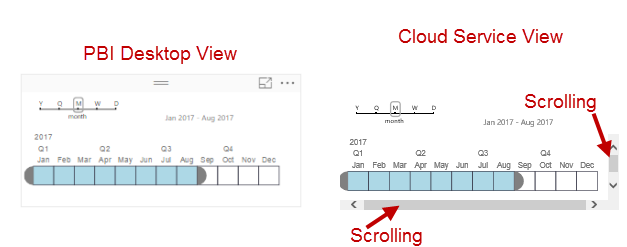
I am having trouble with the Timeline Slicer custom visualization. When I use this visualization in the Desktop app, everything looks great! As soon as I publish it the service, it adds scroll bars to the visualization.

PBI Timeline.png

I have tried changing the size of the timeline in the desktop, and republishing this to the service online, but continue to run into this issue.  Has anyone else had this problem?

1 ACCEPTED SOLUTION
Anonymous
Not applicable

As I started messing around with more of the settings, I figured out that if you make the timeline height atleast 215, this will fix the issue.  You can adjust the height under Format>General.

View solution in original post

1 REPLY 1
Anonymous
Not applicable

As I started messing around with more of the settings, I figured out that if you make the timeline height atleast 215, this will fix the issue.  You can adjust the height under Format>General.

Helpful resources

Announcements
Power BI DataViz World Championships

Power BI Dataviz World Championships

The Power BI Data Visualization World Championships is back! Get ahead of the game and start preparing now!

December 2025 Power BI Update Carousel

Power BI Monthly Update - December 2025

Check out the December 2025 Power BI Holiday Recap!

FabCon Atlanta 2026 carousel

FabCon Atlanta 2026

Join us at FabCon Atlanta, March 16-20, for the ultimate Fabric, Power BI, AI and SQL community-led event. Save $200 with code FABCOMM.