Join us at FabCon Atlanta from March 16 - 20, 2026, for the ultimate Fabric, Power BI, AI and SQL community-led event. Save $200 with code FABCOMM.
Register now!The Power BI Data Visualization World Championships is back! Get ahead of the game and start preparing now! Learn more
Hi all!
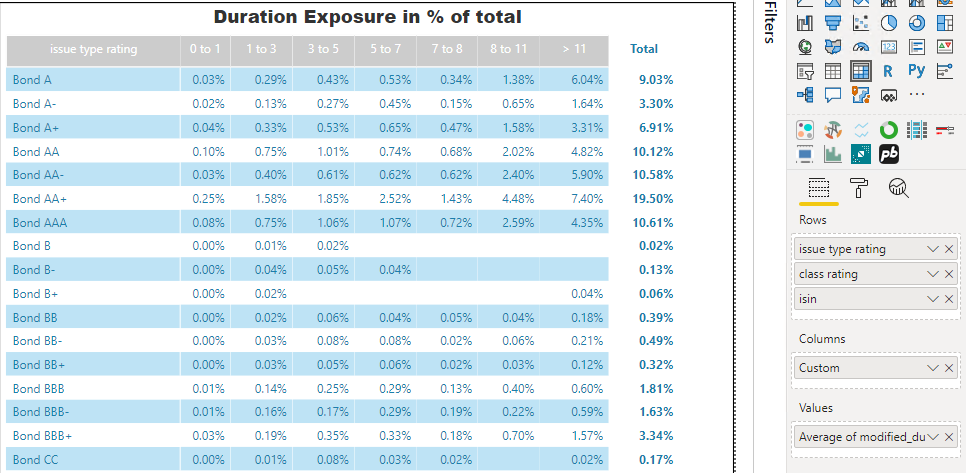
I have to make a Matrix Duration Exposure. I've made bins for Duration creating Custom Column. The values of a matrix are average Duration values in % that fit each bin. I need to substitute blank "cells" of a Matrix on 0.
I already tried to make Py visualization but with no success. Made the desired result in Jupiter Notebook, but it can't be loaded as visualization since it is a table
Any ideas on how to do it?
@dax, @Desktop
Solved! Go to Solution.
Hi @Mikhail_Lourie ,
Check the similar thread below:
https://community.powerbi.com/t5/Desktop/Display-zero-instead-of-blank-in-matrix/td-p/193745
Hi. This might be a question for Desktop or dax forum. It's not the best practise to transform blanks but if that what you need you can create a measure like this:
AVG_Measure = AVERAGE(Table[Minutes_duration]) + 0
Adding the +0 at the end of the measure will change the blank values to 0 and won't modify any other value.
Hope this helps
Happy to help!
It doesn't help ...
The reason is that we don't have such values in a Custom Column (if there are no values that get into the current bin)
We need to put 0 for column items that are not in the Custom Column values but could be according to combinatorics rules
Hi @Mikhail_Lourie ,
Check the similar thread below:
https://community.powerbi.com/t5/Desktop/Display-zero-instead-of-blank-in-matrix/td-p/193745
Thank you very much @Anonymous .
You've made my day!!!:)
The Power BI Data Visualization World Championships is back! Get ahead of the game and start preparing now!
Check out the November 2025 Power BI update to learn about new features.