cancel
Showing results for 
Search instead for 
Did you mean: 

Get Fabric Certified for FREE during Fabric Data Days. Don't miss your chance! Request now

Reply
Garlan
New Member

Store different credentials for Google Analytics

Hi everyone,


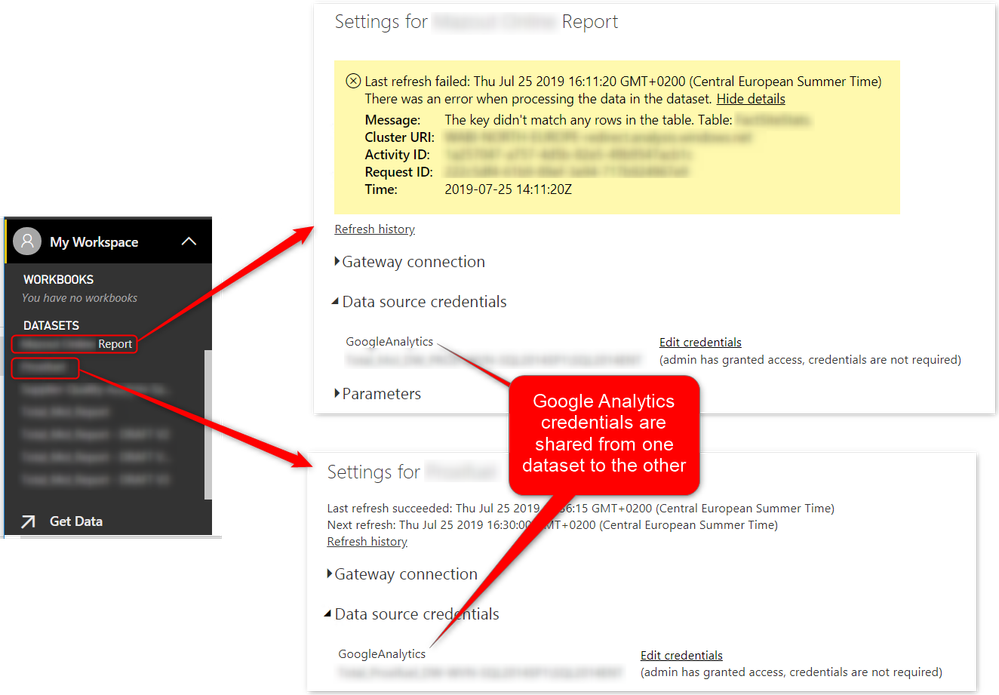
I have two different pbix files that work fine with each a different connection to Google Analytics through the built-in connector. But once I upload both to the service then the credentials get merged and only the last one uploaded is kept which makes it impossible to refresh both.


If I download both pbix from the service I see that they both connect to a single Google email address. This is why the error message is the following, the report in error can connect but with the wrong email address and can't find the tables needed.


2019-07-25_16h14_40.pngIs there a way to separate the credentials or to parameterize them with the built-in connector ?

3 REPLIES 3
floressdiego
Helper I
Helper I

Hello, 

Is this problem still a thing? I am having the same trouble, I have 2 different GA credentials and one forbids the other one from refreshing.

v-lili6-msft
Community Support
Community Support

hi, @Garlan 

You could refer to this similar post:

https://community.powerbi.com/t5/Service/Can-I-add-two-google-analytics-to-power-bi/td-p/18797


Best Regards,

Lin

Community Support Team _ Lin
If this post helps, then please consider Accept it as the solution to help the other members find it more quickly.

Hi Lin,


Thank you for your answer. Sadly I saw that post and I think it refers to multiple website for a single email address.


In my case I have a report that uses address1@gmail.com to get GA data for one website. If I upload it to the service it works fine.

Then I created another report that uses address2@gmail.com to get GA data for another website. If I upload it to the service it works fine but then the first report doesn't work anymore as it uses address2@gmail.com as well and cannot find the first website.

If I go to the credentials for dataset of the first report I can change to address1@gmail.com for it to work but then the second report won't work anymore as it will use address1@gmail.com as well.


I guess a solution would be to create a custom datasource with M query but I'd like to avoid that since both report work fine on their own.


Best wishes,

Hugo

Helpful resources

Announcements
November Power BI Update Carousel

Power BI Monthly Update - November 2025

Check out the November 2025 Power BI update to learn about new features.

Fabric Data Days Carousel

Fabric Data Days

Advance your Data & AI career with 50 days of live learning, contests, hands-on challenges, study groups & certifications and more!

FabCon Atlanta 2026 carousel

FabCon Atlanta 2026

Join us at FabCon Atlanta, March 16-20, for the ultimate Fabric, Power BI, AI and SQL community-led event. Save $200 with code FABCOMM.

Top Solution Authors
Top Kudoed Authors