cancel
Showing results for 
Search instead for 
Did you mean: 

July 7 - July 17 | Round 2 of the Power BI Dataviz World Championships. Don't miss your chance! Learn more

Reply
Garlan
New Member

Store different credentials for Google Analytics

Hi everyone,


I have two different pbix files that work fine with each a different connection to Google Analytics through the built-in connector. But once I upload both to the service then the credentials get merged and only the last one uploaded is kept which makes it impossible to refresh both.


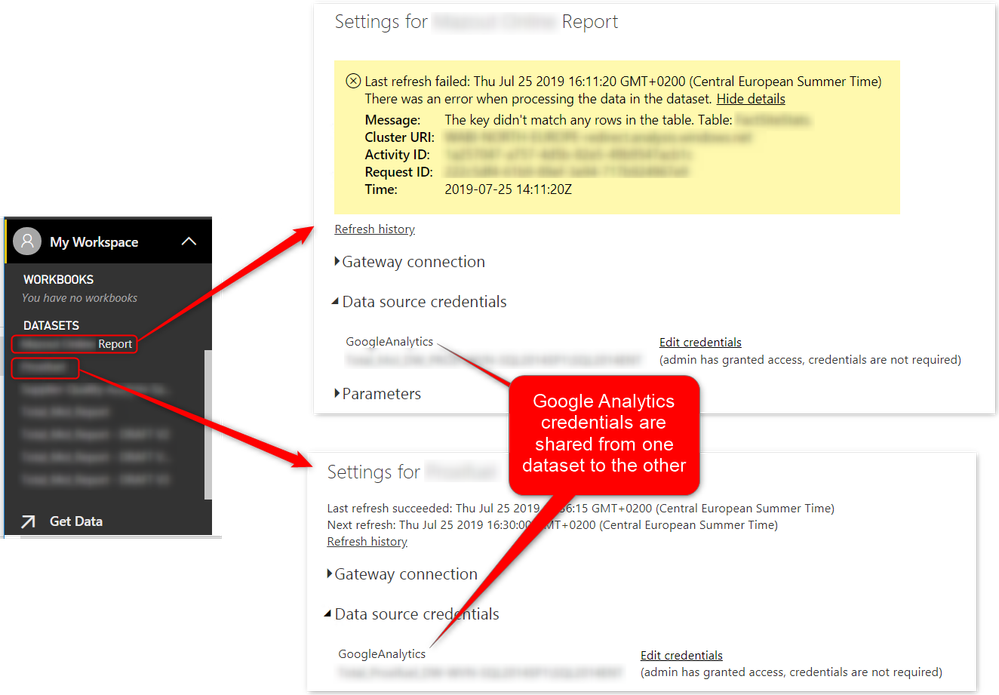
If I download both pbix from the service I see that they both connect to a single Google email address. This is why the error message is the following, the report in error can connect but with the wrong email address and can't find the tables needed.


2019-07-25_16h14_40.pngIs there a way to separate the credentials or to parameterize them with the built-in connector ?

3 REPLIES 3
floressdiego
Helper I
Helper I

Hello, 

Is this problem still a thing? I am having the same trouble, I have 2 different GA credentials and one forbids the other one from refreshing.

v-lili6-msft
Community Support
Community Support

hi, @Garlan 

You could refer to this similar post:

https://community.powerbi.com/t5/Service/Can-I-add-two-google-analytics-to-power-bi/td-p/18797


Best Regards,

Lin

Community Support Team _ Lin
If this post helps, then please consider Accept it as the solution to help the other members find it more quickly.

Hi Lin,


Thank you for your answer. Sadly I saw that post and I think it refers to multiple website for a single email address.


In my case I have a report that uses [email protected] to get GA data for one website. If I upload it to the service it works fine.

Then I created another report that uses [email protected] to get GA data for another website. If I upload it to the service it works fine but then the first report doesn't work anymore as it uses [email protected] as well and cannot find the first website.

If I go to the credentials for dataset of the first report I can change to [email protected] for it to work but then the second report won't work anymore as it will use [email protected] as well.


I guess a solution would be to create a custom datasource with M query but I'd like to avoid that since both report work fine on their own.


Best wishes,

Hugo

Helpful resources

Announcements
FabCon and SQLCon Barcelona 2026

FabCon & SQLCon – Barcelona 2026

Join us in Barcelona for FabCon and SQLCon, the Fabric, Power BI, SQL, and AI community event. Save €200 with code FABCMTY200.

60 days of Data Days Carousel

Data Days 2026

Join Data Days 2026: 60 days of free live/on-demand sessions, challenges, study groups, and certification opportunities.

Power BI DataViz World Championships carousel

Power BI DataViz World Championships - June 2026

A new Power BI DataViz World Championship is coming this June! Don't miss out on submitting your entry.