We've captured the moments from FabCon & SQLCon that everyone is talking about, and we are bringing them to the community, live and on-demand. Starts on April 14th. Register now
Hi @nerra ,
If the Unassign workspace option is selected, it removes all the related workspace deployment settings.
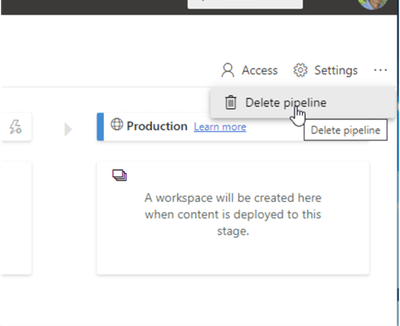
As an alternative to unassigning the workspace, the entire pipeline can be deleted by clicking on the ellipse / three dot button in the upper right corner of the Power BI window. Once deleted, though, the pipeline details are removed completely, similar to unassigning a workspace.
IF you create Power BI Deployment Pipelines with Power BI Embedded.Pausing the Embedded service will stop the Deployment Pipelines feature from working on Workspaces, however once resumed the feature will continue to work as normal. refer :https://www.datahai.co.uk/power-bi/how-to-create-power-bi-deployment-pipelines-with-power-bi-embedde...
Wish it is helpful for you!
Best Regards
Lucien
Hi @nerra ,
If the Unassign workspace option is selected, it removes all the related workspace deployment settings.
As an alternative to unassigning the workspace, the entire pipeline can be deleted by clicking on the ellipse / three dot button in the upper right corner of the Power BI window. Once deleted, though, the pipeline details are removed completely, similar to unassigning a workspace.
IF you create Power BI Deployment Pipelines with Power BI Embedded.Pausing the Embedded service will stop the Deployment Pipelines feature from working on Workspaces, however once resumed the feature will continue to work as normal. refer :https://www.datahai.co.uk/power-bi/how-to-create-power-bi-deployment-pipelines-with-power-bi-embedde...
Wish it is helpful for you!
Best Regards
Lucien
You can ask your tenant admin to restart the impacted capacity or capacities.
If you have recently started exploring Fabric, we'd love to hear how it's going. Your feedback can help with product improvements.
A new Power BI DataViz World Championship is coming this June! Don't miss out on submitting your entry.
Share feedback directly with Fabric product managers, participate in targeted research studies and influence the Fabric roadmap.