Learn from the best! Meet the four finalists headed to the FINALS of the Power BI Dataviz World Championships! Register now
Hi @nerra ,
If the Unassign workspace option is selected, it removes all the related workspace deployment settings.
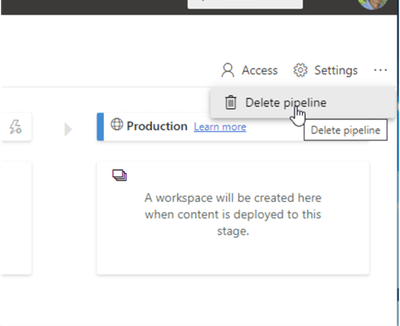
As an alternative to unassigning the workspace, the entire pipeline can be deleted by clicking on the ellipse / three dot button in the upper right corner of the Power BI window. Once deleted, though, the pipeline details are removed completely, similar to unassigning a workspace.
IF you create Power BI Deployment Pipelines with Power BI Embedded.Pausing the Embedded service will stop the Deployment Pipelines feature from working on Workspaces, however once resumed the feature will continue to work as normal. refer :https://www.datahai.co.uk/power-bi/how-to-create-power-bi-deployment-pipelines-with-power-bi-embedde...
Wish it is helpful for you!
Best Regards
Lucien
Hi @nerra ,
If the Unassign workspace option is selected, it removes all the related workspace deployment settings.
As an alternative to unassigning the workspace, the entire pipeline can be deleted by clicking on the ellipse / three dot button in the upper right corner of the Power BI window. Once deleted, though, the pipeline details are removed completely, similar to unassigning a workspace.
IF you create Power BI Deployment Pipelines with Power BI Embedded.Pausing the Embedded service will stop the Deployment Pipelines feature from working on Workspaces, however once resumed the feature will continue to work as normal. refer :https://www.datahai.co.uk/power-bi/how-to-create-power-bi-deployment-pipelines-with-power-bi-embedde...
Wish it is helpful for you!
Best Regards
Lucien
You can ask your tenant admin to restart the impacted capacity or capacities.
| User | Count |
|---|---|
| 24 | |
| 19 | |
| 11 | |
| 10 | |
| 7 |
| User | Count |
|---|---|
| 42 | |
| 38 | |
| 18 | |
| 17 | |
| 16 |