cancel
Showing results for 
Search instead for 
Did you mean: 

The Power BI Data Visualization World Championships is back! Get ahead of the game and start preparing now! Learn more

Reply
BlackBird
Helper I
Helper I

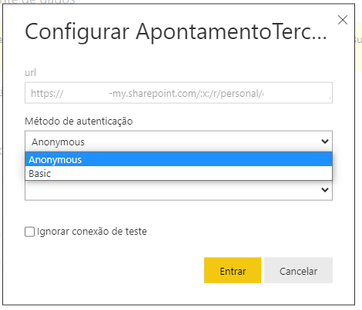
Source Credentials missing

I'm trying to schedule the update but the "Oauth 2" option is missing on Source Credentials.


credentialsmissing.png


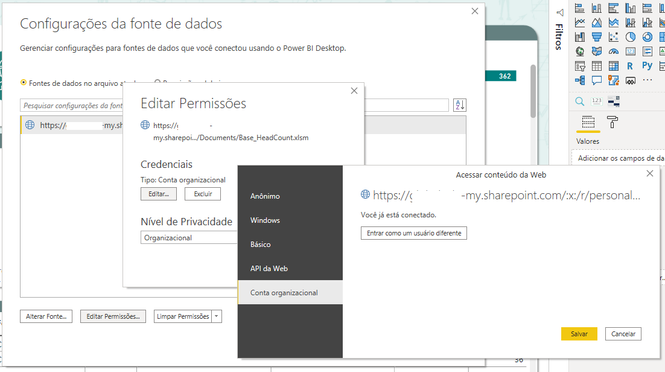
On desktop everything works fine:

credentialsok.png


What I'm doing wrong?

4 REPLIES 4
Greg_Deckler
Community Champion
Community Champion

@BlackBird - What connector are you using?


Follow on LinkedIn
@ me in replies or I'll lose your thread!!!
Instead of a Kudo, please vote for this idea
Become an expert!: Enterprise DNA
External Tools: MSHGQM
YouTube Channel!: Microsoft Hates Greg
Latest book!:
DAX For Humans

DAX is easy, CALCULATE makes DAX hard...

Web


Source = Excel.Workbook(Web.Contents("https://XXXXX-my.sharepoint.com/:x:/r/personal/XXXXXXX/Documents/Base_HeadCount.xlsm"), null, true),

Anonymous
Not applicable

Hi @BlackBird ,

Please review the solutions in the following threads, hope they can  help you resolve the problem.

Confirming Schedule Refresh SharePoint

On-premises data gateway OData OAuth2

Merge or append on-premises and cloud data sources

Best Regards

Rena

Hi, Lena, thanks for replying.


Gateway use is blocked im my company, we can only use cloud.


Helpful resources

Announcements
Power BI DataViz World Championships

Power BI Dataviz World Championships

The Power BI Data Visualization World Championships is back! Get ahead of the game and start preparing now!

December 2025 Power BI Update Carousel

Power BI Monthly Update - December 2025

Check out the December 2025 Power BI Holiday Recap!

FabCon Atlanta 2026 carousel

FabCon Atlanta 2026

Join us at FabCon Atlanta, March 16-20, for the ultimate Fabric, Power BI, AI and SQL community-led event. Save $200 with code FABCOMM.