cancel
Showing results for 
Search instead for 
Did you mean: 

The Power BI Data Visualization World Championships is back! Get ahead of the game and start preparing now! Learn more

Reply
caantjes
Frequent Visitor

Sort on multiple columns


I have several reports created where it would be nice to sort on multiple columns.  For example (1) number of orders decreasing year and month or (2) seqenced by weeks the number of tickets for each department in decreasing volume.

Part of this want is that the multi column sort is very flexible in MS Excel


Do we need to put this on a request list or is this possible and I just missed it ?


Thanks !


7 REPLIES 7
StewartHunter
Advocate I
Advocate I

I think the idea you are looking for is here.

claudiobr
Regular Visitor

I kinda cheated this by creating a new column called "order" that represents exactly the order by I want.

v-qiuyu-msft
Community Support
Community Support

Hi @caantjes,


What do you mean about sorting on multiple columns? Can you share a screenshot for us to understand the requirement clearly?


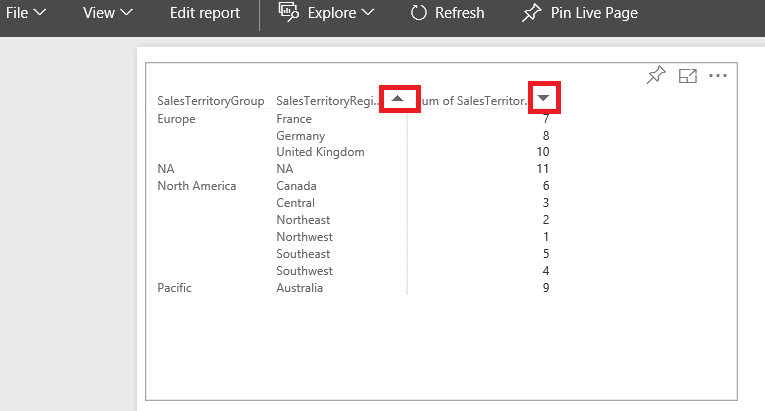
Currently, in Power BI Service, to sort columns, we can only click the sort button. See:


q1.PNG


Best Regards,
Qiuyun Yu

Community Support Team _ Qiuyun Yu
If this post helps, then please consider Accept it as the solution to help the other members find it more quickly.

Hi Qiuyun


It would be in your example to sort the territory groups in DESC alphabetical order and the territory region in ASC alphabetical order. You would define subsequent sorts on colums to allow for either reading.  In MS Excel more advanced configuration is available.


Let me know if this helps.


Thanks.


Corne


Hi @caantjes,


Do you mean you want to get a feature like Custom Sort in Excel? Currently, in a table visual, we need to set sort order for each column one by one. For your requirement, please post feedback and vote on this idea item: Custom Sort Lists.


Best Regards,
Qiuyun Yu

Community Support Team _ Qiuyun Yu
If this post helps, then please consider Accept it as the solution to help the other members find it more quickly.
Greg_Deckler
Community Champion
Community Champion

You would want to post that to Ideas if it is not there already.


Follow on LinkedIn
@ me in replies or I'll lose your thread!!!
Instead of a Kudo, please vote for this idea
Become an expert!: Enterprise DNA
External Tools: MSHGQM
YouTube Channel!: Microsoft Hates Greg
Latest book!:
DAX For Humans

DAX is easy, CALCULATE makes DAX hard...

Hi,


You can do this easily on the Query Editor, just rightclick - sort the first column you want, and then do it for the second column you want to sort. You can see the M formula created, to check if it looks like something you've intended.


Oops- I didn't realize this was Service forum 🙂 I think it should still be possible since technically an M query is running there


Helpful resources

Announcements
Power BI DataViz World Championships

Power BI Dataviz World Championships

The Power BI Data Visualization World Championships is back! Get ahead of the game and start preparing now!

December 2025 Power BI Update Carousel

Power BI Monthly Update - December 2025

Check out the December 2025 Power BI Holiday Recap!

FabCon Atlanta 2026 carousel

FabCon Atlanta 2026

Join us at FabCon Atlanta, March 16-20, for the ultimate Fabric, Power BI, AI and SQL community-led event. Save $200 with code FABCOMM.