cancel
Showing results for 
Search instead for 
Did you mean: 

Data Days is here! Join us now for 60+ days of learning, challenges, and connection. Learn more

Reply
Mohammed-
Resolver I
Resolver I

Sort by column in power bi service

Hello ,

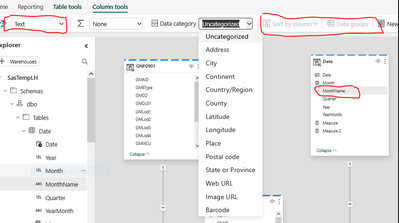
  Why the Sort by coulmn disappear as in the photo


Mohammed_0-1701208966137.pngi

Please the column type text and for the category list  all relatedn to Region s and no accept any change

i  sent the request to the commity befor and i get an answer Update Data Category . how ?


the second question how i can connect Pipelines t the my local server i tried to use getway connection which I use with Dataflow Gen2  but its filed


please any help


2 REPLIES 2
Olufemi7
Solution Sage
Solution Sage

Hi @Mohammed- 


Thanks for your questions happy to help!


Regarding the “Sort by Column” issue:


The “Sort by Column” option usually appears in Power BI Desktop under the Column tools tab.


If it’s missing in Power BI Service, that’s expected, it’s a feature you need to configure in Desktop first.


Make sure:

- The column you're trying to sort is selected.

- Both columns (the one you're sorting and the one you're sorting by) have compatible data types.


- The Data Category is correctly set (e.g., Region, Country, etc.).


Once you've made the changes in Power BI Desktop, republish your report to the Service and the sort order should reflect.


About connecting Pipelines to your local server:


If you're using Dataflow Gen2 and the gateway connection failed:

- Confirm your on-premises data gateway is installed and running.

- Make sure the data source is correctly configured in the gateway settings.

- Check that your firewall allows traffic to Power BI and Fabric services.

- You might also try connecting directly to your Lakehouse or Warehouse if that suits your setup better.

vivien57
Super User
Super User

Hello @Mohammed- 

Have you found a solution to your problem?

Because there are several different questions in your post.

Have a nice day,

Vivien

Helpful resources

Announcements
Fabric Data Days is here Carousel

Fabric Data Days 2026

Don't miss out on Data Days, June 15 through August 7. Learn Fabric, Power BI, SQL, AI and more.

May Power BI Update Carousel

Power BI Monthly Update - May 2026

Check out the May 2026 Power BI update to learn about new features.

Power BI DataViz World Championships carousel

Power BI DataViz World Championships - June 2026

A new Power BI DataViz World Championship is coming this June! Don't miss out on submitting your entry.