FabCon is coming to Atlanta
Join us at FabCon Atlanta from March 16 - 20, 2026, for the ultimate Fabric, Power BI, AI and SQL community-led event. Save $200 with code FABCOMM.
Register now!- Power BI forums
- Get Help with Power BI
- Desktop
- Service
- Report Server
- Power Query
- Mobile Apps
- Developer
- DAX Commands and Tips
- Custom Visuals Development Discussion
- Health and Life Sciences
- Power BI Spanish forums
- Translated Spanish Desktop
- Training and Consulting
- Instructor Led Training
- Dashboard in a Day for Women, by Women
- Galleries
- Data Stories Gallery
- Themes Gallery
- Contests Gallery
- QuickViz Gallery
- Quick Measures Gallery
- Visual Calculations Gallery
- Notebook Gallery
- Translytical Task Flow Gallery
- TMDL Gallery
- R Script Showcase
- Webinars and Video Gallery
- Ideas
- Custom Visuals Ideas (read-only)
- Issues
- Issues
- Events
- Upcoming Events
The Power BI Data Visualization World Championships is back! Get ahead of the game and start preparing now! Learn more
- Power BI forums
- Forums
- Get Help with Power BI
- Service
- Re: Sort A to Z impossible
- Subscribe to RSS Feed
- Mark Topic as New
- Mark Topic as Read
- Float this Topic for Current User
- Bookmark
- Subscribe
- Printer Friendly Page


- Mark as New
- Bookmark
- Subscribe
- Mute
- Subscribe to RSS Feed
- Permalink
- Report Inappropriate Content
Sort A to Z impossible
Hello,
I am having an issue with sorting an axis for my chart... It is sorted by default Z to A and when I click it again it changes the sorting for amounts ... I cannot have my months to start by 01 like I use to... is it a desktop bug?
Thank you !
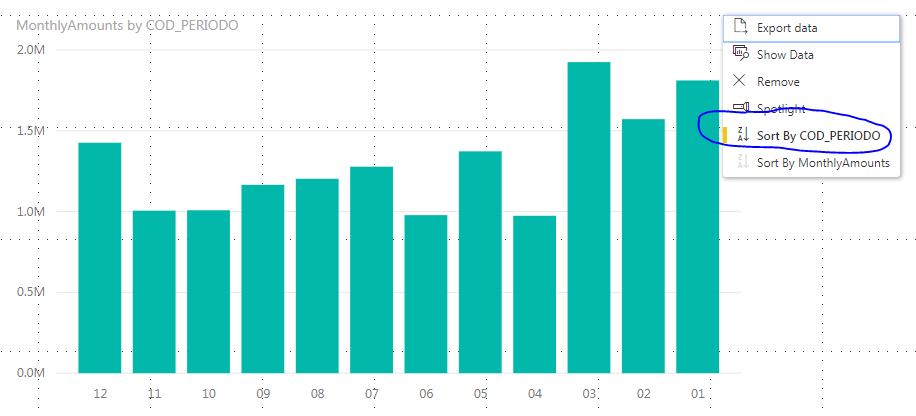
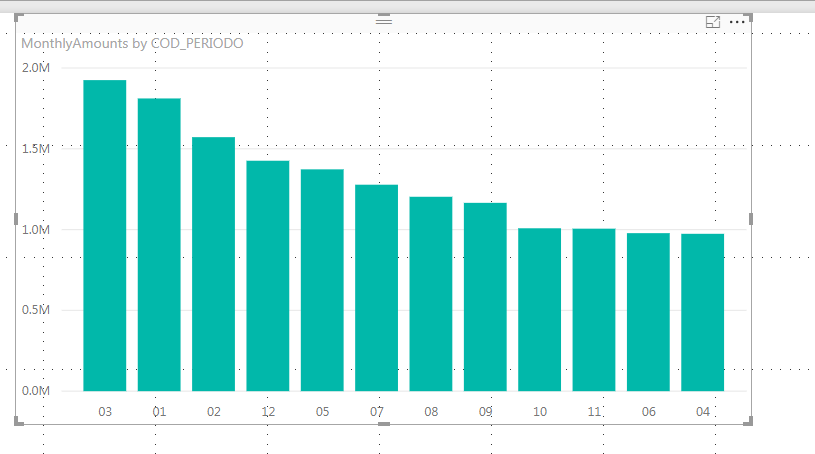
Solved! Go to Solution.
- Mark as New
- Bookmark
- Subscribe
- Mute
- Subscribe to RSS Feed
- Permalink
- Report Inappropriate Content
For information, I tried it on an older version from a coworker and it's working perfectly fine. The newer version has a bug.
Thank you for your help !


- Mark as New
- Bookmark
- Subscribe
- Mute
- Subscribe to RSS Feed
- Permalink
- Report Inappropriate Content
I'm experiencing the same issue as well.
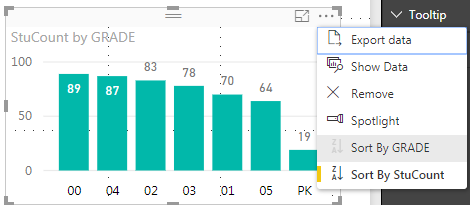
I am unable to achieve a sort of A to Z on any Chart features.... only Z-A works.
This appears to be from the May 2018 update.
- Mark as New
- Bookmark
- Subscribe
- Mute
- Subscribe to RSS Feed
- Permalink
- Report Inappropriate Content
For information, I tried it on an older version from a coworker and it's working perfectly fine. The newer version has a bug.
Thank you for your help !
- Mark as New
- Bookmark
- Subscribe
- Mute
- Subscribe to RSS Feed
- Permalink
- Report Inappropriate Content
I opened an issue about this. Please go vote it up so Microsoft is aware of the problem.


- Mark as New
- Bookmark
- Subscribe
- Mute
- Subscribe to RSS Feed
- Permalink
- Report Inappropriate Content

- Mark as New
- Bookmark
- Subscribe
- Mute
- Subscribe to RSS Feed
- Permalink
- Report Inappropriate Content
HI @lassuied,
Maybe you can try to add a category column for current group, then modify 'sort by column' properties to change its sort order.
Sort by column in Power BI Desktop
Regards,
Xiaoxin Sheng
- Mark as New
- Bookmark
- Subscribe
- Mute
- Subscribe to RSS Feed
- Permalink
- Report Inappropriate Content
Hello Xiaoxin,
I am just trying to report a bug from a newer version of Power BI. I was able to do this sorting before with no issue. Now I cannot do it anymore.
- Mark as New
- Bookmark
- Subscribe
- Mute
- Subscribe to RSS Feed
- Permalink
- Report Inappropriate Content
If it is, then when you want to change the Sort Order, you actually have to click on the Z to A on the actual icon, and not on the name for it to then sort A to Z
- Mark as New
- Bookmark
- Subscribe
- Mute
- Subscribe to RSS Feed
- Permalink
- Report Inappropriate Content
Hello ! Thank you for your reply, the months are not stored as numbers (because I need the 0 as first character between January and September).
What I do not understand is that I've never had the issue before, when I was clicking on A to Z it was sorted Z to A and when clicking on Z to A it went back to A to Z ...
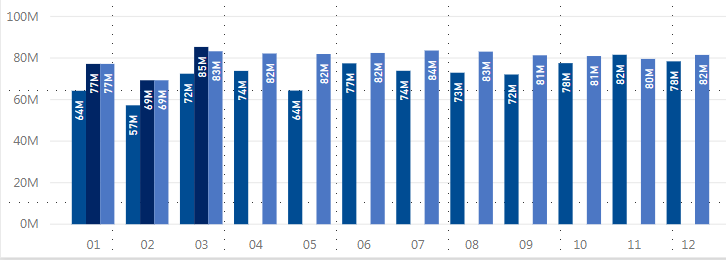
I aslo have the same issue for amounts ... Something changed in the new desktop version... Below is a screenshot of a chart made few month ago ... Now if I am trying to sort by month it messes up everything ... I am just trying to report a bug ...
Helpful resources

Power BI Dataviz World Championships
The Power BI Data Visualization World Championships is back! Get ahead of the game and start preparing now!

Power BI Monthly Update - December 2025
Check out the December 2025 Power BI Holiday Recap!

FabCon Atlanta 2026
Join us at FabCon Atlanta, March 16-20, for the ultimate Fabric, Power BI, AI and SQL community-led event. Save $200 with code FABCOMM.


| User | Count |
|---|---|
| 58 | |
| 56 | |
| 35 | |
| 18 | |
| 14 |


