cancel
Showing results for 
Search instead for 
Did you mean: 

Data Days is here! Join us now for 60+ days of learning, challenges, and connection. Learn more

Reply
jmillar
Helper I
Helper I

Slow Service visual

Hi all;

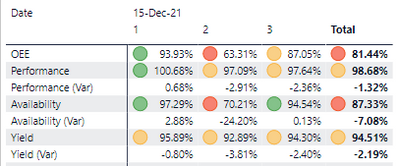
I'm having some difficulty with the following visual:

jmillar_0-1639659580887.png

There are a few other measures as well.  Originally this was a composite model with direct query components (the mandate is a near-time OEE view for the current production day) but for troubleshooting purposes I've convert it all to Import.  The entire data set is maybe 1200 records (max).  In Desktop, the visuals all refresh pretty snappily (1-2 second update time).  In the service, though, they seem to take longer.  There are several visuals on the page, and most update in under 5 seconds which I consider acceptable.  The table shown above, though, can take upwards of 4 minutes!


I'm at a loss to troubleshoot further to explain why local performance in desktop is acceptable, while performance in the service (both browser and mobile app) are abysmal.  Does anyone have any suggestions?


UPDATE: I believe I've narrowed this down to the conditional formatting on the matrix.  Remove that, and it speeds up.  The conditional formatting is set using field values, though, as the stoplight thresholds don't have static targets -- they need to be calculated.  Has anyone else experienced this and/or found a solution?


Thanks,

Jason


8 REPLIES 8
lbendlin
Super User
Super User

Use DAX Studio to evaluate the queries generated by this visual.

Thanks @lbendlin -- I had actually started down that road.  I grabbed the DAX generated by the visual, and when I run timing against that in DAX Studio results return in ~300-400 ms, which is what I'd consider acceptable.  However, I'm new to trying to performance tune models -- most of ours have been relatively straightfoward that, for the most part, "just behave".

Is your data source in Import mode or direct Query? Any gateway involved?

@lbendlin There is a gateway involved.  Originally the solution was in DirectQuery mode, but for troubleshooting purposes I've switched it to Import with an hourly refresh schedule just to eliminate gateway bottlenecks, etc....

Do you know if Query caching is enabled in your tenant?

That I'm not sure about, although I can check.  Is that something that you'd advise trying?  I haven't dealt with that before so should I be concerned about:

  • Adverse affects on other solutions in the tenant
  • Any caching, given the original scope requirement was near-time data

Thanks, by the way, for your assistance with this.

When you examined the DAX query in DAX Studio did you do that against the local dataset on the Power BI Desktop or against the XMLA endpoint in the service?  I would recommend to do the latter so you get a more realistic reading on the performance.

Now that you mention it, I believe I was using the Desktop version.  Let me try it against the endpoint and see what that shows.

Helpful resources

Announcements
Fabric Data Days is here Carousel

Fabric Data Days 2026

Don't miss out on Data Days, June 15 through August 7. Learn Fabric, Power BI, SQL, AI and more.

May Power BI Update Carousel

Power BI Monthly Update - May 2026

Check out the May 2026 Power BI update to learn about new features.

Power BI DataViz World Championships carousel

Power BI DataViz World Championships - June 2026

A new Power BI DataViz World Championship is coming this June! Don't miss out on submitting your entry.