Join us at FabCon Atlanta from March 16 - 20, 2026, for the ultimate Fabric, Power BI, AI and SQL community-led event. Save $200 with code FABCOMM.
Register now!The Power BI Data Visualization World Championships is back! Get ahead of the game and start preparing now! Learn more
Hello,
I designed my report by Power Desktop and uploaded to Power BI Service.
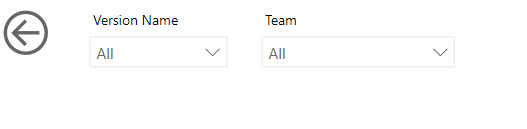
I can see the Slicer style is dropdown style in the workspace on Service, it shows the same as PowerBI desktop.
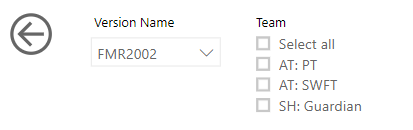
When I published the APP with the reports on the PowerBI Service, some Slicer dropdown style change to list style automatically.
I only want to show these slicers as List style.
Do you have any ideas?
Solved! Go to Solution.
hi, @hemingt
Here is a similar post for you refer to:
If you still have the problem, please share your simple sample pbix file for us have a test.
Best Regards,
Lin
It is been 2 years since this problem was posted and it seems that Microsoft done nothing to fix it.
Really disappointing.
hi, @hemingt
Here is a similar post for you refer to:
If you still have the problem, please share your simple sample pbix file for us have a test.
Best Regards,
Lin
@hemingt We are encountering this issue at present. The only workaround seems to be to have 'select all' enabled for dropdowns
Hope this works for you in the interim
I have tried both of the approaches (select all enabled for dropdown and replacing the old bookmark with a new one). Neither approach works consistently.
I would really appreciate not having to re-do my slicers every time this happens.
Hello @Anonymous
Thank you!
It seems it does not work for me!
The Power BI Data Visualization World Championships is back! Get ahead of the game and start preparing now!
Check out the November 2025 Power BI update to learn about new features.