Get certified for free when you join Fabric Data Days 2026 and dive into Fabric, Power BI, SQL, AI, and other essential data skills.
Join nowJuly 28 - August 9 | Final Round of the Power BI Dataviz World Championships. This is your chance. Learn more
Hi,
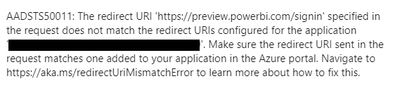
I have a specific error during the sign-in process for the Web connector to Excel files on Sharepoint. Here is the error:
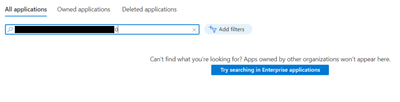
My admin can't find the application id mentioned in the error message in the Azure portal, preventing us from applying the potential solution linked at the end of the error message.
My connections to other data sources are not affected.
What are the solutions to this issue?
Thanks
Hi, @lmillot
Error messages AADSTS50011 typically indicate that the redirect URL provided does not match the URL registered by the application in the Azure portal when attempting to verify the identity using Azure AD.
You may be able to try the following link for a solution:
How to Get Your Question Answered Quickly
Best Regards
Yongkang Hua
If this post helps, then please consider Accept it as the solution to help the other members find it more quickly.
We tried that but the application mentioned in the error message doesn't show up in the Azure portal.
Hi, @lmillot
You can check if there is an error in the SharePoint link, check if you have registered the app in Azure, and if the app is registered by another user or administrator, you may need to contact them to get access. Or check whether the app has enabled user access in Azure.
You can check out the following links:
How to Get Your Question Answered Quickly
Best Regards
Yongkang Hua
If this post helps, then please consider Accept it as the solution to help the other members find it more quickly.
If you love stickers, then you will definitely want to check out our community sticker challenge, Barcelona edition!
Check out the July 2026 Power BI update to learn about new features.
| User | Count |
|---|---|
| 10 | |
| 9 | |
| 9 | |
| 7 | |
| 5 |