Hi @v-frfei-msft
How I created the table can also be found at this topic: http://community.powerbi.com/t5/Desktop/Create-column-filled-with-measures/m-p/325596#M145213
The last update of my power BI desktop was after the June 2018 Update.
Sample data:
Representative (used in the slicer)
| Representative |
| Representative A |
| Representative B |
| Representative C |
Visit reports:
| Rep code | Company | Type |
| 1111 | Company A | Acquisitie |
| 1111 | Company B | ROS |
| 1111 | Company C | Relatie beheer |
| 1111 | Company D | Contractverlenging |
| 1111 | Company E | Acquisitie |
| 1111 | Company F | ROS |
| 2222 | Company G | Relatie beheer |
| 2222 | Company H | Acquisitie |
| 2222 | Company I | Acquisitie |
| 2222 | Company J | ROS |
| 2222 | Company K | Relatie beheer |
| 2222 | Company L | Acquisitie |
| 3333 | Company M | Relatie beheer |
| 3333 | Company N | Acquisitie |
| 3333 | Company O | Contractverlenging |
| 3333 | Company P | ROS |
| 3333 | Company Q | Acquisitie |
| 3333 | Company R | Relatie beheer |
Translate:
| Representative | Code |
| Representative A | 1111 |
| Representative B | 2222 |
| Representative C | 3333 |
Goals:
| Representative | Type | Goal |
| Representative A | Acquisitie | 20 |
| Representative A | ROS | 10 |
| Representative A | Relatie beheer | 30 |
| Representative A | Contractverlenging | 5 |
| Representative B | Acquisitie | 20 |
| Representative B | ROS | 10 |
| Representative B | Relatie beheer | 30 |
| Representative B | Contractverlenging | 5 |
| Representative C | Acquisitie | 20 |
| Representative C | ROS | 10 |
| Representative C | Relatie beheer | 30 |
| Representative C | Contractverlenging | 5 |
Type
| Type |
| Acquisitie |
| ROS |
| Relatie beheer |
| Contractverlenging |
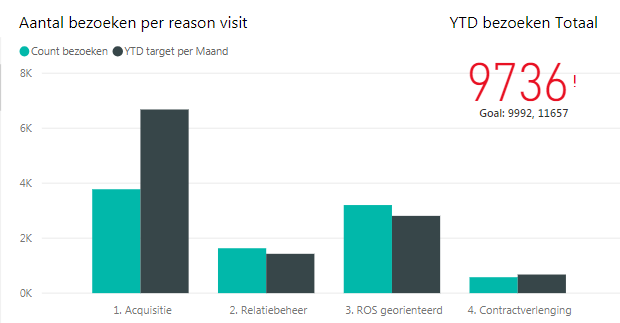
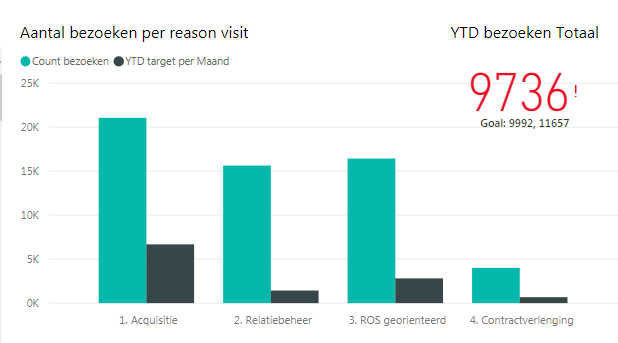
I am using the clustered column chart:
Axis:
- 'Type' [Type]
Value:
- Calculated measure (Count visit):
CALCULATE(COUNT('Visit report' [Company]); USERELATIONSHIP('translate' [Code];'Visit report' [Rep Code]))- Calculate column (Target PM)
('Goals' [Goal]/12)*MONTH(TODAY())
I don't know how to sent a pbix file on here. Otherwise I can create a sample file.
Hope you can help me any further!
Kind regards,
Guido