cancel
Showing results for 
Search instead for 
Did you mean: 

Learn from the best! Meet the four finalists headed to the FINALS of the Power BI Dataviz World Championships! Register now

Reply
Anonymous
Not applicable

Sharing

As an admin I want to extract the list of Dashboards and reports that are shared with evryone in my organization. How to do this please guide.

1 ACCEPTED SOLUTION
Anonymous
Not applicable

Hi @Anonymous ,


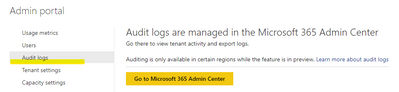
Go to Audit logs>365 admin center>Audit log search:

Annotation 2020-06-19 130728.png

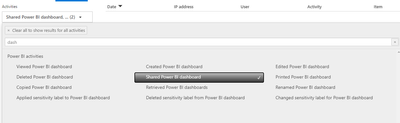
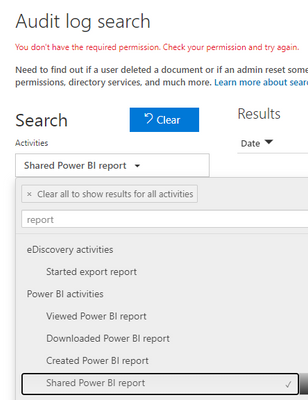
Select power bI report and dashboard:

Annotation 2020-06-19 131032.pngAnnotation 2020-06-19 131004.png

Select the datetime periods you need.

Here is the reference.

https://docs.microsoft.com/en-us/power-bi/admin/service-admin-auditing


Best Regards,
Kelly
Did I answer your question? Mark my post as a solution!

View solution in original post

2 REPLIES 2
Anonymous
Not applicable

Hi @Anonymous ,


Go to Audit logs>365 admin center>Audit log search:

Annotation 2020-06-19 130728.png

Select power bI report and dashboard:

Annotation 2020-06-19 131032.pngAnnotation 2020-06-19 131004.png

Select the datetime periods you need.

Here is the reference.

https://docs.microsoft.com/en-us/power-bi/admin/service-admin-auditing


Best Regards,
Kelly
Did I answer your question? Mark my post as a solution!
Anonymous
Not applicable

Hi @Anonymous,


This is tricky ..


There's a number of ways reports and dashboards can be shared, and not all of them allow to be extracted easily.

- Individual Report / Dasbhoard Sharing --> Absolutely no way to automate this (to date, or I've missed it). Open a report/dashboard, and browse to the access tab

- Workspace Access (Individual Access) --> Get Group Users or use the Expand function

- Workspace Access (Group Access) --> Get Group Users, then translate group membership through Office 365 Graph API or Azure AD

- Apps Access (Individual Access) --> Manually check the apps

- Apps Access (Group Access) --> Manually check the apps

- Email Subscriptions --> Manually check them (I think, but I'd have to go look for it ..)


In addition, set up Audit Logs extract to capture the ShareReport, ShareDashboard actions, and act upon them.

You'll want to work with groups (Either O365 or Azure AD) to streamline it as much as possible, and definitely try to reduce individual report sharing to a minimum.


My definite advice is to go look at the newly released Power BI Enterprise Deployment Whitepaper, which covers strategies for you to adapt.  

Helpful resources

Announcements
Power BI DataViz World Championships carousel

Power BI DataViz World Championships - June 2026

A new Power BI DataViz World Championship is coming this June! Don't miss out on submitting your entry.

Join our Fabric User Panel

Join our Fabric User Panel

Share feedback directly with Fabric product managers, participate in targeted research studies and influence the Fabric roadmap.

March Power BI Update Carousel

Power BI Community Update - March 2026

Check out the March 2026 Power BI update to learn about new features.

Top Kudoed Authors