cancel
Showing results for 
Search instead for 
Did you mean: 

Next up in the FabCon + SQLCon recap series: The roadmap for Microsoft SQL and Maximizing Developer experiences in Fabric. All sessions are available on-demand after the live show. Register now

Reply
Anonymous
Not applicable

Sharing report with external user not working but settings are enabled

Hi all


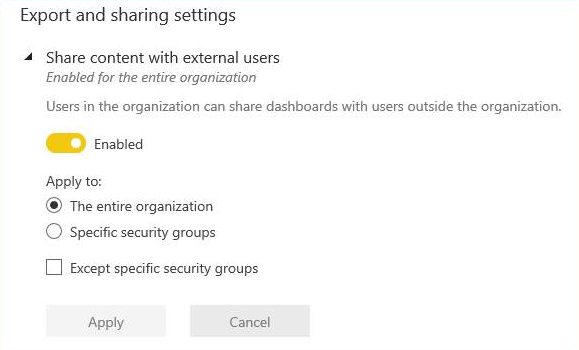
I had tried to share a dashbaord I created with an external user and was getting an error message. Asked my global admin what the settings were and was shown this screen


global.PNG


Does anyone know what else we need to check as to why I still cannot share with external users?


thanks!


1 ACCEPTED SOLUTION

Hi @Anonymous,


This is not an error, just a warning that awares you were sharing dashboards to users outside your organization. Ensure the recipient's email address is correct, click the "Share" button, a "Successfully share" message will be prompted. 


After sharing, those external users won't see the shared dashboards on their worksapce on service. They have to click the dashboard link in email to view dashboard content.


Regards,

Yuliana Gu

Community Support Team _ Yuliana Gu
If this post helps, then please consider Accept it as the solution to help the other members find it more quickly.

View solution in original post

4 REPLIES 4
bajee
Kudo Kingpin
Kudo Kingpin

Hi 


Please go through this link for extranal sharing


https://docs.microsoft.com/en-us/power-bi/service-admin-azure-ad-b2b


Regards,

Bajee

v-yulgu-msft
Microsoft Employee
Microsoft Employee

Hi @Anonymous,


What error message did you get? And what did those recipients see when they opened the shared dashboard?


By the way, with sharing, whether you share content inside or outside your organization, you and your recipients need a Power BI Pro license, or the content needs to be in a Premium capacity. Only your direct recipients can see the shared dashboard. People outside your organization can't see any data at all if role- or row-level security is implemented on on-premises Analysis Services tabular models.


Regards,

Yuliana Gu

Community Support Team _ Yuliana Gu
If this post helps, then please consider Accept it as the solution to help the other members find it more quickly.
Anonymous
Not applicable

Thanks Yuliana


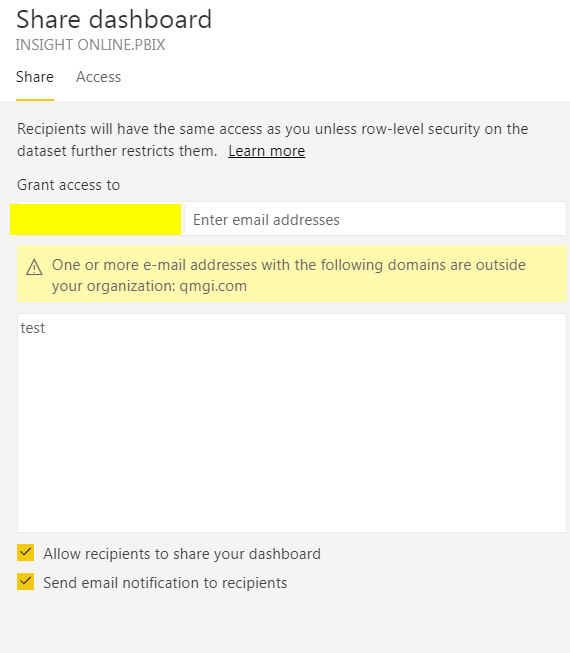
I get the following - I try to share to an external user (who has Pro version of Power BI) and do not get past this screen.


Admin has advised that external sharing is turned on so not sure what's happening


sharing error.PNG

Hi @Anonymous,


This is not an error, just a warning that awares you were sharing dashboards to users outside your organization. Ensure the recipient's email address is correct, click the "Share" button, a "Successfully share" message will be prompted. 


After sharing, those external users won't see the shared dashboards on their worksapce on service. They have to click the dashboard link in email to view dashboard content.


Regards,

Yuliana Gu

Community Support Team _ Yuliana Gu
If this post helps, then please consider Accept it as the solution to help the other members find it more quickly.

Helpful resources

Announcements
New to Fabric survey Carousel

New to Fabric Survey

If you have recently started exploring Fabric, we'd love to hear how it's going. Your feedback can help with product improvements.

Power BI DataViz World Championships carousel

Power BI DataViz World Championships - June 2026

A new Power BI DataViz World Championship is coming this June! Don't miss out on submitting your entry.

Join our Fabric User Panel

Join our Fabric User Panel

Share feedback directly with Fabric product managers, participate in targeted research studies and influence the Fabric roadmap.

March Power BI Update Carousel

Power BI Community Update - March 2026

Check out the March 2026 Power BI update to learn about new features.