Join us at FabCon Atlanta from March 16 - 20, 2026, for the ultimate Fabric, Power BI, AI and SQL community-led event. Save $200 with code FABCOMM.
Register now!Get Fabric Certified for FREE during Fabric Data Days. Don't miss your chance! Request now
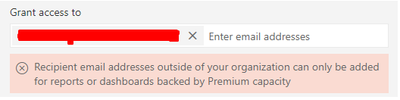
Can't share a dataset with a user, they are using a pro license as am I. I get the following error when trying to add a user:
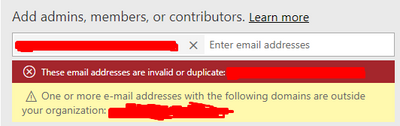
I also tried creating a new Workspace and re-published the dataset to this, but couldn’t add the user there either:
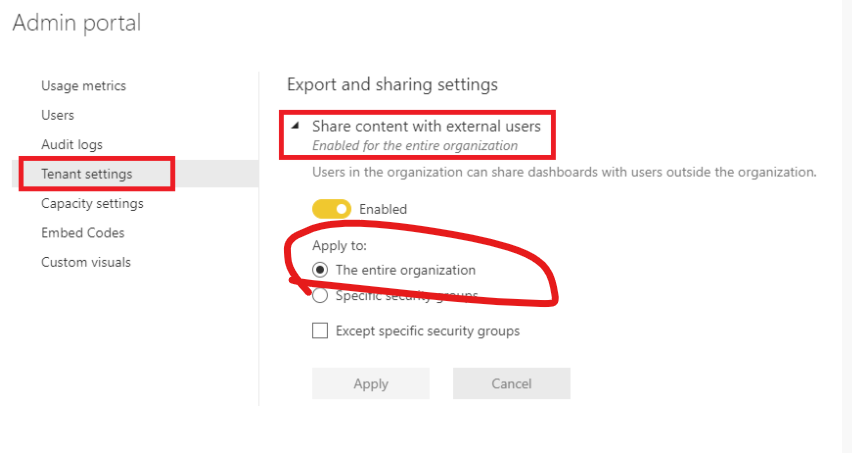
The admin setting 'allow external shares' or something like that is on.
Solved! Go to Solution.
Hi, @HW31
Make sure you have applied it to entire organization.
You also need to check the Azure AD B2B external collaboration settings .
Please check if solution in these related thread work for you.
https://community.powerbi.com/t5/Service/Sharing-outside-of-organization-what-am-I-missing/m-p/61991...
https://community.powerbi.com/t5/Service/These-email-addresses-re-invalid-or-duplicate/m-p/823433
https://community.powerbi.com/t5/Service/Can-t-share-report-outside-my-organization/m-p/717861
Best Regards,
Community Support Team _ Eason
Hi, @HW31
Make sure you have applied it to entire organization.
You also need to check the Azure AD B2B external collaboration settings .
Please check if solution in these related thread work for you.
https://community.powerbi.com/t5/Service/Sharing-outside-of-organization-what-am-I-missing/m-p/61991...
https://community.powerbi.com/t5/Service/These-email-addresses-re-invalid-or-duplicate/m-p/823433
https://community.powerbi.com/t5/Service/Can-t-share-report-outside-my-organization/m-p/717861
Best Regards,
Community Support Team _ Eason
Check out the November 2025 Power BI update to learn about new features.
Advance your Data & AI career with 50 days of live learning, contests, hands-on challenges, study groups & certifications and more!