Don't miss your chance to take the Fabric Data Engineer (DP-700) exam on us!
Learn moreNext up in the FabCon + SQLCon recap series: The roadmap for Microsoft SQL and Maximizing Developer experiences in Fabric. All sessions are available on-demand after the live show. Register now
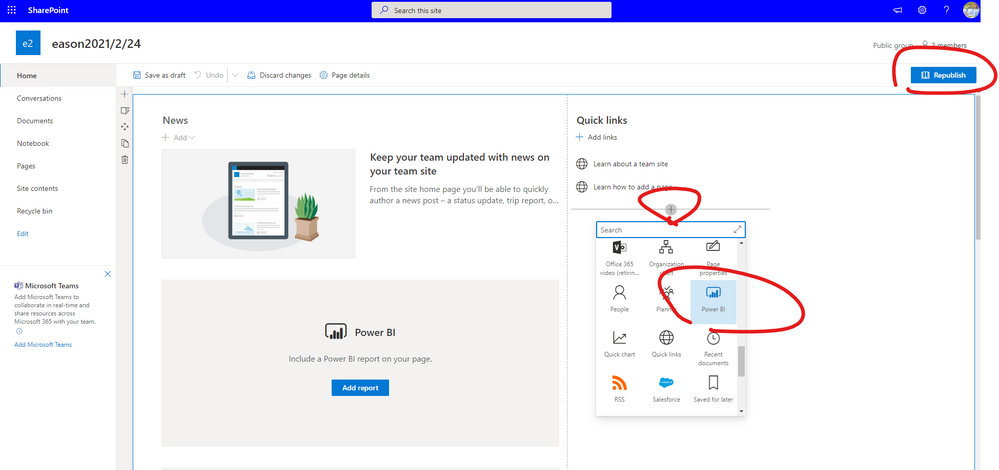
I'm trying to embed my power bi report into sharepoint for staff members who dont have a power bi account. I cant see the link specifically for power bi in the sharepoint. apparently this icon only shows if you have a power bi pro/premium account.
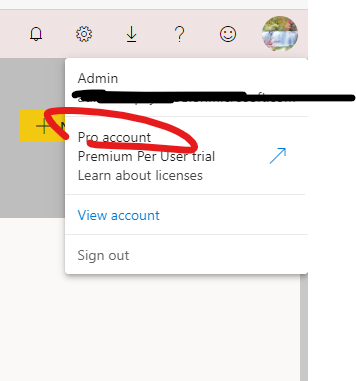
When i check my office 365 account it says i have power bi pro, but when i check my subscription the web application for power bi, under settings and then subscriptions, it says 'You dont have any subscriptions', even after i signed up for the premium free trial.
Please assist
Hi, @Anonymous
Please use the account to log in to the PowerBI service first to ensure that the pro license permission has been successfully activated.
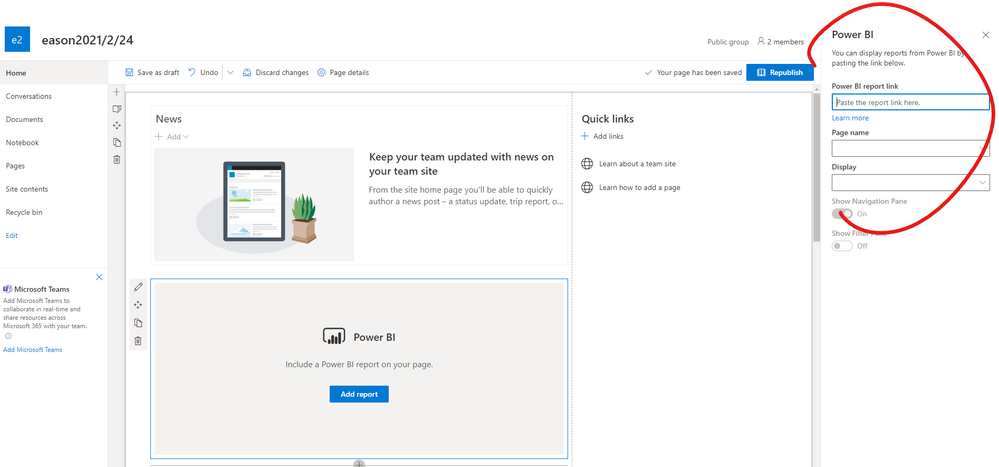
If you are referring to the plugin on powerbi embed to sharepoint , you can refer to this document about embed report to check some steps and limitations.
https://docs.microsoft.com/en-us/power-bi/collaborate-share/service-embed-report-spo
Best Regards,
Community Support Team _ Eason
If you have recently started exploring Fabric, we'd love to hear how it's going. Your feedback can help with product improvements.
A new Power BI DataViz World Championship is coming this June! Don't miss out on submitting your entry.
Share feedback directly with Fabric product managers, participate in targeted research studies and influence the Fabric roadmap.