cancel
Showing results for 
Search instead for 
Did you mean: 

We've captured the moments from FabCon & SQLCon that everyone is talking about, and we are bringing them to the community, live and on-demand. Starts on April 14th. Register now

Reply
Anonymous
Not applicable

Setup data alerts Email

Hi,

I am trying to set up email alerts from power bi service dashboard, to monitor my data changes.

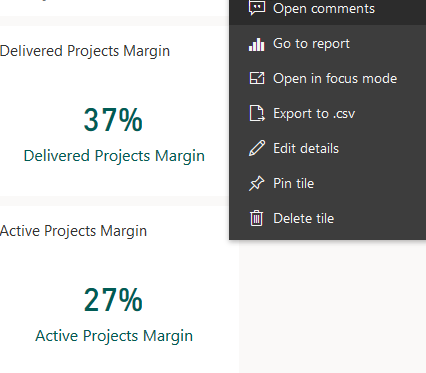
The tiles here show me the profit margins which feed directly from SSAS tabular model, which is refreshed evry 15 minutes.

But it is not showing me the option to manage my alerts. Please see the image below.

Capture.PNG


Can anyone help me out with this issue if possible? Is there an alternate to setting up data alerts.


Thanks

 
2 ACCEPTED SOLUTIONS
v-xicai
Community Support
Community Support

Hi @Anonymous ,


You can set alerts on tiles if you have a Power BI Pro license. You can also set alerts if someone shares a dashboard that's in a Premium capacity. Alerts can only be set on tiles pinned from report visuals, and only on gauges, KPIs, and cards. Alerts can be set on visuals created from streaming datasets that you pin from a report to a dashboard. Alerts can't be set on streaming tiles created directly on the dashboard using Add tile > Custom streaming data.


There are also other limitations you may considerate:

  • Alerts aren't supported for card tiles with date/time measures.
  • Alerts only work with numeric data types.
  • Alerts only work on refreshed data. They don't work on static data.
  • Alerts only work on streaming datasets if you build a KPI, card, or gauge report visual and then pin that visual to the dashboard.


For reference:

Data alerts in the Power BI service


Best Regards,

Amy


If this post helps, then please consider Accept it as the solution to help the other members find it more quickly.

View solution in original post

Hi @Anonymous ,


Yes, you can set alerts on tiles if you have a Power BI Pro license, or if the shared dashboard is in a Premium capacity. See the Microsoft official document Data alerts in the Power BI service .


Best Regards,

Amy


Community Support Team _ Amy

If this post helps, then please consider Accept it as the solution to help the other members find it more quickly.

View solution in original post

4 REPLIES 4
v-xicai
Community Support
Community Support

Hi @Anonymous ,


You can set alerts on tiles if you have a Power BI Pro license. You can also set alerts if someone shares a dashboard that's in a Premium capacity. Alerts can only be set on tiles pinned from report visuals, and only on gauges, KPIs, and cards. Alerts can be set on visuals created from streaming datasets that you pin from a report to a dashboard. Alerts can't be set on streaming tiles created directly on the dashboard using Add tile > Custom streaming data.


There are also other limitations you may considerate:

  • Alerts aren't supported for card tiles with date/time measures.
  • Alerts only work with numeric data types.
  • Alerts only work on refreshed data. They don't work on static data.
  • Alerts only work on streaming datasets if you build a KPI, card, or gauge report visual and then pin that visual to the dashboard.


For reference:

Data alerts in the Power BI service


Best Regards,

Amy


If this post helps, then please consider Accept it as the solution to help the other members find it more quickly.

Anonymous
Not applicable

Thanks a million @v-xicai 

Just one question I need to clarify here is, the Power BI Pro liscence, is it madatory to have one before doing other steps.


Thanks,

Akshay

Hi @Anonymous ,


Yes, you can set alerts on tiles if you have a Power BI Pro license, or if the shared dashboard is in a Premium capacity. See the Microsoft official document Data alerts in the Power BI service .


Best Regards,

Amy


Community Support Team _ Amy

If this post helps, then please consider Accept it as the solution to help the other members find it more quickly.

Anonymous
Not applicable

@v-xicai  Thanks a million Amy

Helpful resources

Announcements
New to Fabric survey Carousel

New to Fabric Survey

If you have recently started exploring Fabric, we'd love to hear how it's going. Your feedback can help with product improvements.

Power BI DataViz World Championships carousel

Power BI DataViz World Championships - June 2026

A new Power BI DataViz World Championship is coming this June! Don't miss out on submitting your entry.

Join our Fabric User Panel

Join our Fabric User Panel

Share feedback directly with Fabric product managers, participate in targeted research studies and influence the Fabric roadmap.

March Power BI Update Carousel

Power BI Community Update - March 2026

Check out the March 2026 Power BI update to learn about new features.

Top Solution Authors