cancel
Showing results for 
Search instead for 
Did you mean: 

The Power BI Data Visualization World Championships is back! Get ahead of the game and start preparing now! Learn more

Reply
CloudMonkey
Post Prodigy
Post Prodigy

Service user seeing report date/times in other country format

Hi


One of my users is seeing dates and times in another country's format - please can you tell me how to fix? She is seeing:

01/28/2021 instead of 28/01/2021

12:00am instead of 00:00am


Thanks!


CM

1 ACCEPTED SOLUTION
v-cazheng-msft
Community Support
Community Support

Hi @CloudMonkey 

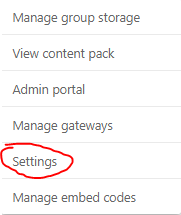
Power BI Service will display the format of date/time according to the Timezone related with the settings of language. So it will be affected by the following settings.


1 Settings>General>Language in Power BI Service
v-cazheng-msft_0-1617267717049.png


v-cazheng-msft_6-1617267767816.png


2 If the Language of the user in Power BI Settings is set as Default(browser language), then the date format will be affected by the Language of the user's browser. Take Microsoft Edge as an example, Settings>Language>Preferred languages.

v-cazheng-msft_2-1617267717076.png


Here is a test.

1 The language of the pbix is English and the date format is as following.

v-cazheng-msft_3-1617267717079.png


2 If the language of Service is set as Chinese, then the date format will look like this.

v-cazheng-msft_4-1617267717079.png


3 After changing the language to English, the date format will change as following.

v-cazheng-msft_5-1617267717080.png


For more details, you can refer How to change the date Format in the Power BI Service.


Best Regards

Caiyun Zheng


Is that the answer you're looking for? If this post helps, then please consider Accept it as the solution to help the other members find it more quickly.


View solution in original post

3 REPLIES 3
v-cazheng-msft
Community Support
Community Support

Hi @CloudMonkey 

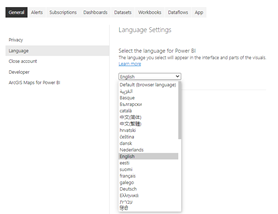
Power BI Service will display the format of date/time according to the Timezone related with the settings of language. So it will be affected by the following settings.


1 Settings>General>Language in Power BI Service
v-cazheng-msft_0-1617267717049.png


v-cazheng-msft_6-1617267767816.png


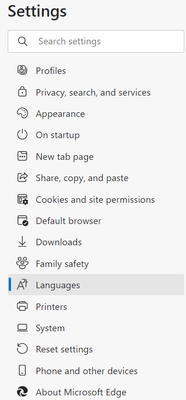
2 If the Language of the user in Power BI Settings is set as Default(browser language), then the date format will be affected by the Language of the user's browser. Take Microsoft Edge as an example, Settings>Language>Preferred languages.
v-cazheng-msft_2-1617267717076.png


Here is a test.

1 The language of the pbix is English and the date format is as following.

v-cazheng-msft_3-1617267717079.png


2 If the language of Service is set as Chinese, then the date format will look like this.

v-cazheng-msft_4-1617267717079.png


3 After changing the language to English, the date format will change as following.

v-cazheng-msft_5-1617267717080.png


For more details, you can refer How to change the date Format in the Power BI Service.


Best Regards

Caiyun Zheng


Is that the answer you're looking for? If this post helps, then please consider Accept it as the solution to help the other members find it more quickly.


HarishKM
Memorable Member
Memorable Member

@CloudMonkey  Hey Mate ,
Kindly enable this setting and republish .

HarishKM_0-1617164187193.png

and 2nd option :

HarishKM_1-1617165101687.png
Try this , It will work .


lbendlin
Super User
Super User

she needs to change the locale settings on her PC.

Helpful resources

Announcements
Power BI DataViz World Championships

Power BI Dataviz World Championships

The Power BI Data Visualization World Championships is back! Get ahead of the game and start preparing now!

December 2025 Power BI Update Carousel

Power BI Monthly Update - December 2025

Check out the December 2025 Power BI Holiday Recap!

FabCon Atlanta 2026 carousel

FabCon Atlanta 2026

Join us at FabCon Atlanta, March 16-20, for the ultimate Fabric, Power BI, AI and SQL community-led event. Save $200 with code FABCOMM.