FabCon is coming to Atlanta
Join us at FabCon Atlanta from March 16 - 20, 2026, for the ultimate Fabric, Power BI, AI and SQL community-led event. Save $200 with code FABCOMM.
Register now!- Power BI forums
- Get Help with Power BI
- Desktop
- Service
- Report Server
- Power Query
- Mobile Apps
- Developer
- DAX Commands and Tips
- Custom Visuals Development Discussion
- Health and Life Sciences
- Power BI Spanish forums
- Translated Spanish Desktop
- Training and Consulting
- Instructor Led Training
- Dashboard in a Day for Women, by Women
- Galleries
- Data Stories Gallery
- Themes Gallery
- Contests Gallery
- Quick Measures Gallery
- Notebook Gallery
- Translytical Task Flow Gallery
- TMDL Gallery
- R Script Showcase
- Webinars and Video Gallery
- Ideas
- Custom Visuals Ideas (read-only)
- Issues
- Issues
- Events
- Upcoming Events
Calling all Data Engineers! Fabric Data Engineer (Exam DP-700) live sessions are back! Starting October 16th. Sign up.
- Power BI forums
- Forums
- Get Help with Power BI
- Service
- Re: Select rows/column in bulk in table for "copy...
- Subscribe to RSS Feed
- Mark Topic as New
- Mark Topic as Read
- Float this Topic for Current User
- Bookmark
- Subscribe
- Printer Friendly Page

- Mark as New
- Bookmark
- Subscribe
- Mute
- Subscribe to RSS Feed
- Permalink
- Report Inappropriate Content
Select rows/column in bulk in table for "copy select" function in table
My employer has disabled the export data function in our Power Bi reports. I use the "copy select" function in tables and then paste into Excel. I click and hold control while I slowly select each row, then "copy select." This is tedious with 100-300 rows in each table. Then I paste into Excel.
Is there any way to select the rows in bulk more quickly, like a control+shift+ up/down shortcut?
I need to be able to manipulate the data in Excel, so a screenshot isn't helpful. My employer will not enable the export data function. Maybe there is better workaround?

- Mark as New
- Bookmark
- Subscribe
- Mute
- Subscribe to RSS Feed
- Permalink
- Report Inappropriate Content
Use Power Automate to export rows from Power BI dataset to Excel

- Mark as New
- Bookmark
- Subscribe
- Mute
- Subscribe to RSS Feed
- Permalink
- Report Inappropriate Content
To select the whole table I right click on the firts column name and then do the copy->selection and I can paste the full table in Excel

- Mark as New
- Bookmark
- Subscribe
- Mute
- Subscribe to RSS Feed
- Permalink
- Report Inappropriate Content
Hi @Anonymous ,
If you still can export report as PDF, you could have a try and import the PDF file into Power BI Desktop. In this way, you could get
the data and then export it from a visualization.
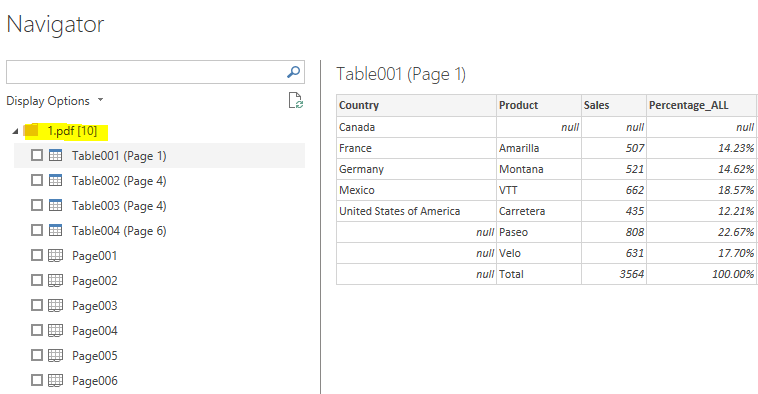
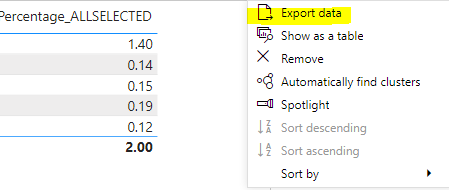
If it can't work, maybe you only can select values one by one using "Ctrl + up/down + enter" or "Ctrl + Click".
Xue Ding
If this post helps, then please consider Accept it as the solution to help the other members find it more quickly.
- Mark as New
- Bookmark
- Subscribe
- Mute
- Subscribe to RSS Feed
- Permalink
- Report Inappropriate Content
Hi, thank you for your suggestion, but I don't have Power Bi Desktop. I just receive reports online. I am unable to export anything, and my employer will not enable that function.
- Mark as New
- Bookmark
- Subscribe
- Mute
- Subscribe to RSS Feed
- Permalink
- Report Inappropriate Content
Hi @Anonymous
Can you filter the table to show only the rows of interest, then copy-select all at once?
Can you ask report creator to create different versions of the table to only include the cells of interest -- maybe use a bookmark?
HTH
Michele


- Mark as New
- Bookmark
- Subscribe
- Mute
- Subscribe to RSS Feed
- Permalink
- Report Inappropriate Content
What if you had to create a table of what you needed in your report?
Once the table is created with what you need you could then use the "Copy Select"?
- Mark as New
- Bookmark
- Subscribe
- Mute
- Subscribe to RSS Feed
- Permalink
- Report Inappropriate Content
Yes, thank you, this is what I am doing. My tables are filtered and quite large, unfortunately. I'm trying to make the copy select faster-- It take at least a second for each row to be selected while I hold down control, and if I mess up and let go of control by mistake, then I have to start over until all are selected again. Just seems clunky.
- Mark as New
- Bookmark
- Subscribe
- Mute
- Subscribe to RSS Feed
- Permalink
- Report Inappropriate Content
Thank you, yes this is what I am doing. The copy select requires me to hold control and individually click each row until it responds and all are selected. Seems much slower than an excel sheet where I could hit control +shift. Thanks for your suggestion.
Helpful resources

FabCon Global Hackathon
Join the Fabric FabCon Global Hackathon—running virtually through Nov 3. Open to all skill levels. $10,000 in prizes!

Power BI Monthly Update - October 2025
Check out the October 2025 Power BI update to learn about new features.

FabCon Atlanta 2026
Join us at FabCon Atlanta, March 16-20, for the ultimate Fabric, Power BI, AI and SQL community-led event. Save $200 with code FABCOMM.


