Get Fabric or SQL Certified for Free.
Get certified for free when you join Fabric Data Days 2026 and dive into Fabric, Power BI, SQL, AI, and other essential data skills.
Join now- Power BI forums
- Get Help with Power BI
- Desktop
- Service
- Report Server
- Power Query
- Mobile Apps
- Developer
- DAX Commands and Tips
- Custom Visuals Development Discussion
- Health and Life Sciences
- Power BI Spanish forums
- Translated Spanish Desktop
- Training and Consulting
- Instructor Led Training
- Dashboard in a Day for Women, by Women
- Galleries
- Data Stories Gallery
- Themes Gallery
- Contests Gallery
- QuickViz Gallery
- Quick Measures Gallery
- Visual Calculations Gallery
- Notebook Gallery
- Translytical Task Flow Gallery
- TMDL Gallery
- R Script Showcase
- Webinars and Video Gallery
- Ideas
- Custom Visuals Ideas (read-only)
- Issues
- Issues
- Events
- Upcoming Events
Try your skills in the Power BI Dataviz World Championship! Round one ends June 26. Join now
- Power BI forums
- Forums
- Get Help with Power BI
- Service
- Re: Select data to create report loading forever
- Subscribe to RSS Feed
- Mark Topic as New
- Mark Topic as Read
- Float this Topic for Current User
- Bookmark
- Subscribe
- Printer Friendly Page

- Mark as New
- Bookmark
- Subscribe
- Mute
- Subscribe to RSS Feed
- Permalink
- Report Inappropriate Content
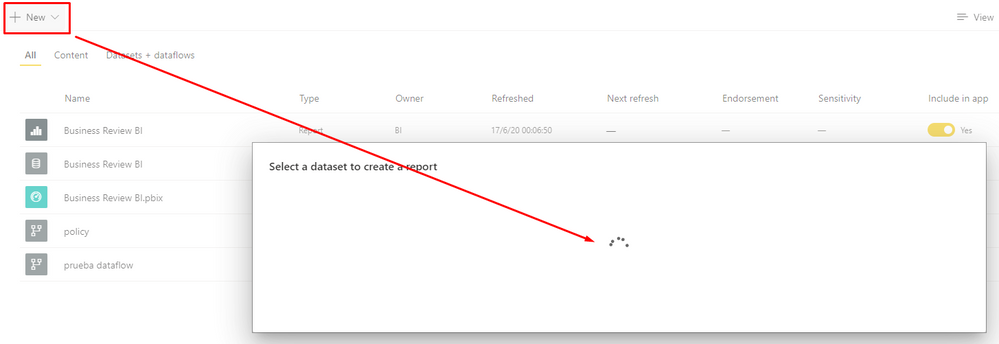
Select data to create report loading forever
Hi there,
Am I the only one having this issue? When I want to create a new report out of an existant dataset, the emergent window won't show any dataset to pick, just forever loading:
🤔
Solved! Go to Solution.


- Mark as New
- Bookmark
- Subscribe
- Mute
- Subscribe to RSS Feed
- Permalink
- Report Inappropriate Content
Hi @Anonymous ,
You might be caught between a classic and a new SharePoint workspace.
https://docs.microsoft.com/en-us/power-bi/collaborate-share/service-create-the-new-workspaces
I would appreciate Kudos if my response was helpful. I would also appreciate it if you would Mark this As a Solution if it solved the problem. Thanks!
Did I answer your question? Mark my post as a solution!
Proud to be a Datanaut!
Private message me for consulting or training needs.
- Mark as New
- Bookmark
- Subscribe
- Mute
- Subscribe to RSS Feed
- Permalink
- Report Inappropriate Content
Hi @Anonymous ,
I have seen this problem before (a few times). The most common reason is the browser. This is because of some browsers have different settings in the background. Try a different browser. Try clearing the cache. Try adding all your Power BI URL's that you are using in this case to your Trusted Sites in IE and/or Edge (yes, even if you are using Chrome).
The next most common reason is the permissions - and sometimes that doesn't give you back a message, it just keeps spinning. Confirm that the userid you are signed in has permissions to the dataset as well.
I would appreciate Kudos if my response was helpful. I would also appreciate it if you would Mark this As a Solution if it solved the problem. Thanks!
Let me know if that works for you.
Did I answer your question? Mark my post as a solution!
Proud to be a Datanaut!
Private message me for consulting or training needs.
- Mark as New
- Bookmark
- Subscribe
- Mute
- Subscribe to RSS Feed
- Permalink
- Report Inappropriate Content
Hi @collinq, thanks for your answer,
Apparently it has something to do with the workspaces as you mentioned; if I try to create a new report on my personal workspace it works just fine, but when I try that on a shared workspace I created (same as the dataset), the non-stop spinning appears. So, everything was created with the same user ID, I'd guess permissions are ok.
Any other ideas? 🤔
- Mark as New
- Bookmark
- Subscribe
- Mute
- Subscribe to RSS Feed
- Permalink
- Report Inappropriate Content
Hi @Anonymous ,
When you say "a shared workspace" do you mean shared WITH you or that you shared? If it was shared WITH you, then you have to confirm that they gave you the permissions to see the dataset.
I would appreciate Kudos if my response was helpful. I would also appreciate it if you would Mark this As a Solution if it solved the problem. Thanks!
Did I answer your question? Mark my post as a solution!
Proud to be a Datanaut!
Private message me for consulting or training needs.
- Mark as New
- Bookmark
- Subscribe
- Mute
- Subscribe to RSS Feed
- Permalink
- Report Inappropriate Content
Hi @collinq
I created it, in Sharepoint (it automatically appeard on my Power BI workspaces)
Just in case, I'll try creating a new one in Power BI and see if that works.
- Mark as New
- Bookmark
- Subscribe
- Mute
- Subscribe to RSS Feed
- Permalink
- Report Inappropriate Content
Hi @Anonymous ,
You might be caught between a classic and a new SharePoint workspace.
https://docs.microsoft.com/en-us/power-bi/collaborate-share/service-create-the-new-workspaces
I would appreciate Kudos if my response was helpful. I would also appreciate it if you would Mark this As a Solution if it solved the problem. Thanks!
Did I answer your question? Mark my post as a solution!
Proud to be a Datanaut!
Private message me for consulting or training needs.
- Mark as New
- Bookmark
- Subscribe
- Mute
- Subscribe to RSS Feed
- Permalink
- Report Inappropriate Content
Indeed. Creating a new workspace did the thing.
I'll read the document!
Thanks again! 😃
Helpful resources

Data Days 2026
Don't miss out on Data Days, June 15 through August 7. Learn Fabric, Power BI, SQL, AI and more.

Power BI DataViz World Championships - June 2026
A new Power BI DataViz World Championship is coming this June! Don't miss out on submitting your entry.

| User | Count |
|---|---|
| 16 | |
| 15 | |
| 13 | |
| 9 | |
| 8 |


| User | Count |
|---|---|
| 40 | |
| 39 | |
| 34 | |
| 28 | |
| 27 |


