Join us at FabCon Atlanta from March 16 - 20, 2026, for the ultimate Fabric, Power BI, AI and SQL community-led event. Save $200 with code FABCOMM.
Register now!The Power BI Data Visualization World Championships is back! It's time to submit your entry. Live now!
Hi!
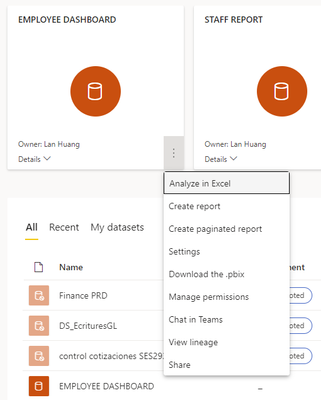
I recently created a report with RLS created with the powerbi desktop and the tested it out and it worked perfectly with no error. For the next step I publish it to service and then go to the dataset and select the three dots for more options, but I am not able to see security so I can assign users to the role. Any help is appreciated.
I have the powerbi pro license and the datasets are from a smartsheet and an excel file.
Solved! Go to Solution.
Hi, @lhuang86
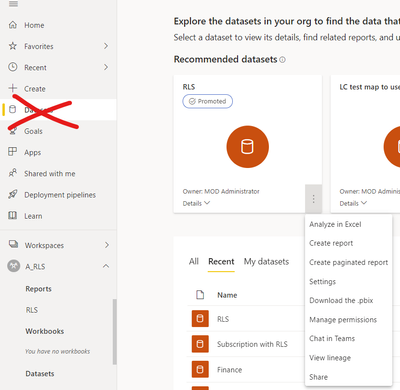
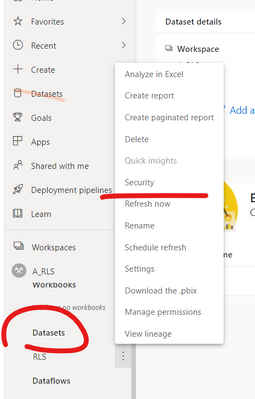
Please select this option from the dataset under the corresponding workspace, rather than in the recommended dataset.
For more details, please refer to this document.
service-admin-rls#manage-security-on-your-model
Best Regards,
Community Support Team _ Eason
Hi, @lhuang86
Please select this option from the dataset under the corresponding workspace, rather than in the recommended dataset.
For more details, please refer to this document.
service-admin-rls#manage-security-on-your-model
Best Regards,
Community Support Team _ Eason
The Power BI Data Visualization World Championships is back! It's time to submit your entry.
Check out the January 2026 Power BI update to learn about new features.
| User | Count |
|---|---|
| 22 | |
| 16 | |
| 10 | |
| 7 | |
| 4 |