cancel
Showing results for 
Search instead for 
Did you mean: 

We've captured the moments from FabCon & SQLCon that everyone is talking about, and we are bringing them to the community, live and on-demand. Starts on April 14th. Register now

Reply
mthomas1973
Helper I
Helper I

Scorecard Data Model

Good morning. 


We are starting to use PowerBI scorecards which is great and I like the fact that I can use the data model for these to create our own custom dashboard. 


Is it possible to 'add' to the model that it presents? For example, I would like to hav a financial year date heirarchy but can't see how to do that. Is it not possible or are there ways of me making this work?


Thank you 

1 ACCEPTED SOLUTION
Burningsuit
Resident Rockstar
Resident Rockstar

Hi @mthomas1973 

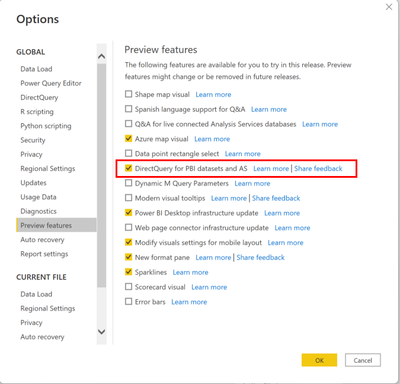
You need to turn on the preview option "Direct Query for PBI datasets and AS" in Power BI Desktop

Burningsuit_1-1648723588900.png

This will enable you, once you've connected to the Goals Dataset, to further connect to other datasources and relate them in to the model.

see: Power BI Composite Models | What’s The Big Deal? | Burningsuit

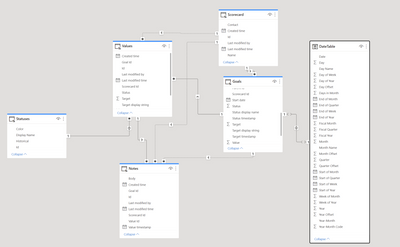
You can then add your own date table, or indeed any other data you want to relate with the Goals..


Burningsuit_0-1648723492704.png

Hope this helps

Stuart

View solution in original post

2 REPLIES 2
Burningsuit
Resident Rockstar
Resident Rockstar

Hi @mthomas1973 

You need to turn on the preview option "Direct Query for PBI datasets and AS" in Power BI Desktop

Burningsuit_1-1648723588900.png

This will enable you, once you've connected to the Goals Dataset, to further connect to other datasources and relate them in to the model.

see: Power BI Composite Models | What’s The Big Deal? | Burningsuit

You can then add your own date table, or indeed any other data you want to relate with the Goals..


Burningsuit_0-1648723492704.png

Hope this helps

Stuart

That was really helpful thank you. I banged my head against a wall for a bit before I realised that scorecards in your own workspace won't work with this. Once I used it from a different workspace all fell into place!


Thank you again. 

Helpful resources

Announcements
New to Fabric survey Carousel

New to Fabric Survey

If you have recently started exploring Fabric, we'd love to hear how it's going. Your feedback can help with product improvements.

Power BI DataViz World Championships carousel

Power BI DataViz World Championships - June 2026

A new Power BI DataViz World Championship is coming this June! Don't miss out on submitting your entry.

Join our Fabric User Panel

Join our Fabric User Panel

Share feedback directly with Fabric product managers, participate in targeted research studies and influence the Fabric roadmap.

March Power BI Update Carousel

Power BI Community Update - March 2026

Check out the March 2026 Power BI update to learn about new features.

Top Solution Authors