cancel
Showing results for 
Search instead for 
Did you mean: 

Get Fabric Certified for FREE during Fabric Data Days. Don't miss your chance! Request now

Reply
Anonymous
Not applicable

Scheduling

Hello


I am rather new to power BI.  I have 2 data source.  1 is an excel spreadsheet and the other is Dynamics Online.  I am unable to create any scheduled refresh.


Any help is greatly appreciated.


Frank

1 ACCEPTED SOLUTION
v-xicai
Community Support
Community Support

Hi @Anonymous ,


There are several scenarios you may considerate:


1.If your excel file is saved on premise, then it needs to use the gateway and configure schedule refresh, see more: :On-premises data gateway , Configure scheduled refresh .

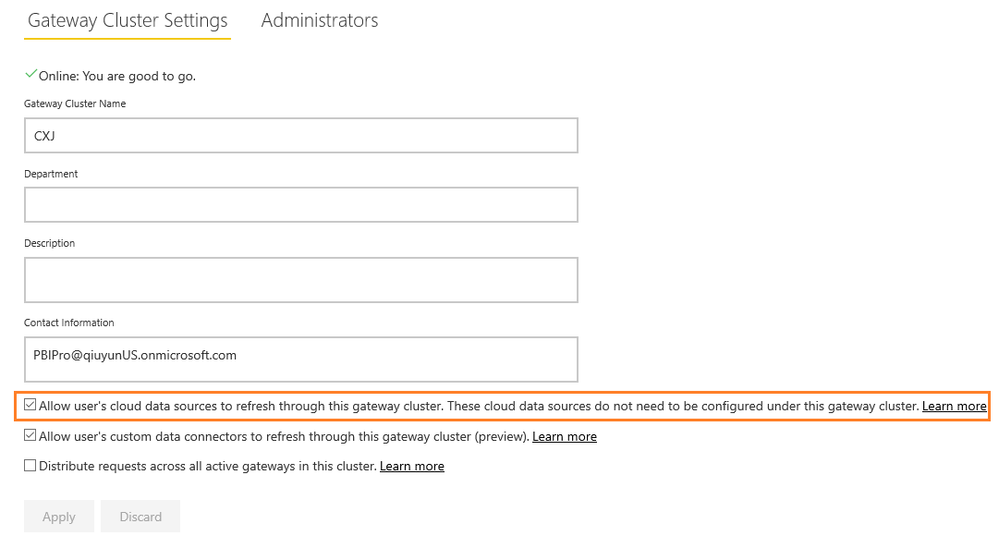
Note that you also need to select Allow user's cloud data sources to refresh through this gateway cluster option Under Gateway Cluster Settings. See: Merge or append on-premises and cloud data sources.
 

4.png


2..If your excel file is saved on line, such as SharePoint online, OneDrive for business and so on, that is to say the dataset only has the cloud data sources , then it needn't to use the gateway. You can manually refresh the dataset by using Refresh now or you can set up a refresh schedule by using Schedule Refresh. Power BI automatically connects to the on line data sources . If the data has changed, Power BI will refresh the dataset and reports in the Power BI service.


Best Regards,

Amy


If this post helps, then please consider Accept it as the solution to help the other members find it more quickly.

View solution in original post

2 REPLIES 2
v-xicai
Community Support
Community Support

Hi  @Anonymous ,


Does that make sense? If so, kindly mark my answer as a solution to help others having the similar issue and close the case. If not,  let me know and I'll try to help you further.


Best regards

Amy

v-xicai
Community Support
Community Support

Hi @Anonymous ,


There are several scenarios you may considerate:


1.If your excel file is saved on premise, then it needs to use the gateway and configure schedule refresh, see more: :On-premises data gateway , Configure scheduled refresh .

Note that you also need to select Allow user's cloud data sources to refresh through this gateway cluster option Under Gateway Cluster Settings. See: Merge or append on-premises and cloud data sources.


4.png


2..If your excel file is saved on line, such as SharePoint online, OneDrive for business and so on, that is to say the dataset only has the cloud data sources , then it needn't to use the gateway. You can manually refresh the dataset by using Refresh now or you can set up a refresh schedule by using Schedule Refresh. Power BI automatically connects to the on line data sources . If the data has changed, Power BI will refresh the dataset and reports in the Power BI service.


Best Regards,

Amy


If this post helps, then please consider Accept it as the solution to help the other members find it more quickly.

Helpful resources

Announcements
November Power BI Update Carousel

Power BI Monthly Update - November 2025

Check out the November 2025 Power BI update to learn about new features.

Fabric Data Days Carousel

Fabric Data Days

Advance your Data & AI career with 50 days of live learning, contests, hands-on challenges, study groups & certifications and more!

FabCon Atlanta 2026 carousel

FabCon Atlanta 2026

Join us at FabCon Atlanta, March 16-20, for the ultimate Fabric, Power BI, AI and SQL community-led event. Save $200 with code FABCOMM.

Top Solution Authors
Top Kudoed Authors