Join us at FabCon Atlanta from March 16 - 20, 2026, for the ultimate Fabric, Power BI, AI and SQL community-led event. Save $200 with code FABCOMM.
Register now!Learn from the best! Meet the four finalists headed to the FINALS of the Power BI Dataviz World Championships! Register now
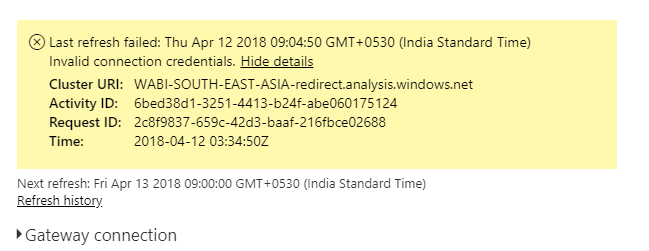
The following error is encountered when refresh is triggered.
Data source: SQL Server
The gateway is configured successfully on server.
Data source added successfully in gateway cluster (test connection successful). The server and DB name are same as used in report.
Scheduled refresh successfully.
But the above error is encountered when refresh is triggered (manually/scheduled).
Please suggest workarounds if any.
Hi @Anonymous,
You need to map your Power BI Service & Gateway login with the login of Windows user of the computer where Gateway installed.
In this post, I've explained how to do that - http://community.powerbi.com/t5/Integrations-with-Files-and/Gateway-connected-but-can-not-access-SSAS-tabular-The-name/m-p/339954#M15143
Hi,
Any suggestions/workarounds anyone??
Thanks in advance,
Suguna.
Take a look at this post and see if it helps!
https://community.powerbi.com/t5/Service/Schedule-refresh-gateway-credentials/m-p/394171#M42996
Hi @Anonymous,
From the error details, it shows the error is invalid connection credentials.
Have you refreshed successfully before?
Could you create a screenshot to show me if your gateway and the data source have configured well?
Go to Power BI service ——Settings——Manage Gateways
Best Regards,
Dale
Hi Dale @v-jiascu-msft,
The refresh has not happened successfully for this data source/gateway before. It always throws the error- Invalid connection credentials.
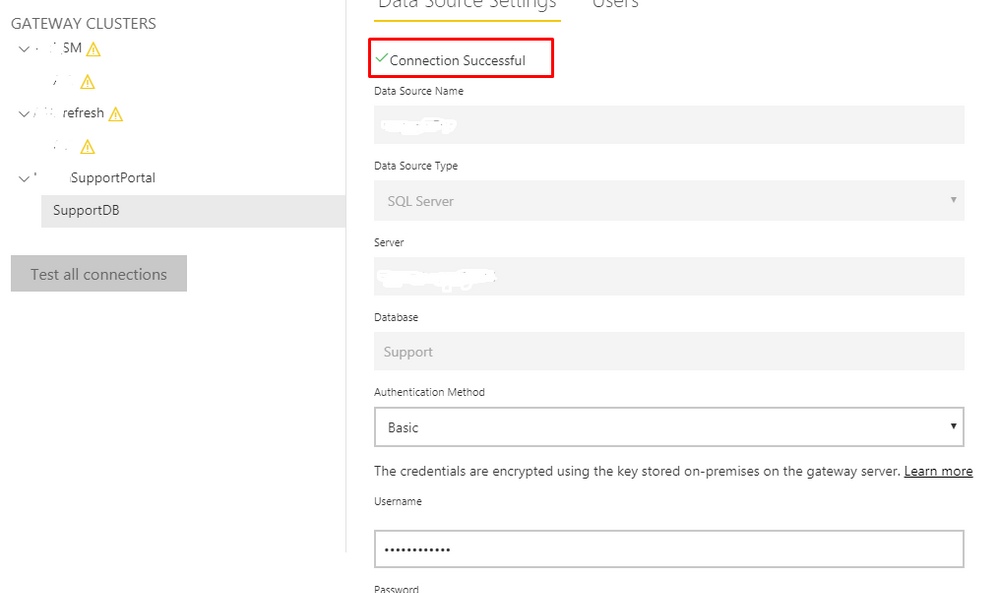
Please refer the screenshot below which shows successful connection of gateway with datasource-
Regards,
Suguna.
Share feedback directly with Fabric product managers, participate in targeted research studies and influence the Fabric roadmap.
Check out the February 2026 Power BI update to learn about new features.