cancel
Showing results for 
Search instead for 
Did you mean: 

We've captured the moments from FabCon & SQLCon that everyone is talking about, and we are bringing them to the community, live and on-demand. Starts on April 14th. Register now

Reply
Anonymous
Not applicable

Scheduled Refresh Error (Data Source Credentials)

I've published an online report and it was getting database from an API perfectly while using desktop version.

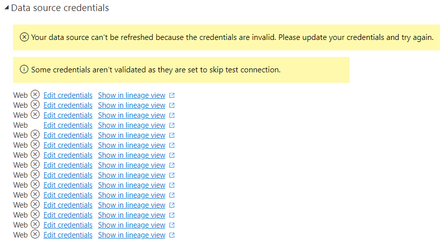
Now I'm trying to set Schedule Refresh on app.powerbi.com to get data from the same API, but it shows the error:

gasilva8_1-1638394953396.png

Anonymous or basic authentication methods shows the same error:

gasilva8_3-1638395561253.png

On Refresh history:

gasilva8_4-1638395883667.png

What should I do to solve that error?


5 REPLIES 5
GilbertQ
Super User
Super User

Hi @Anonymous 


What I would suggest is to look at this solution where you need to put in your details as part of the header call


Solved: Retrieve API response headers - Microsoft Power BI Community


Did I answer your question? Mark my post as a solution!

Proud to be a Super User!


Power BI Blog

Anonymous
Not applicable

Hi @GilbertQ

Actually that is what I'm doing. Here is the code I'm using, and it works fine with PB Desktop.


let
username = "user@email.com",
password = "mypassword",
ChecklistGetOnePage =(
pagina) as record =>
let
txPagina = Text.From(pagina),
urlOptions = [Headers=[email=username, password=password], Query=[page=txPagina]],
Source =
Json.Document(Web.Contents("https://exampleurlapi.com",urlOptions)),
data = Source[data],
registos = [Data=data[items],Pages=data[lastPage]]
in
registos,

resFirstPage = ChecklistGetOnePage(1),
totalPaginas = resFirstPage[Pages],

GeneratedList =
List.Generate(
()=>
[i=0, res = ChecklistGetOnePage(i+1)],
each [i]<= totalPaginas,
each [i=[i]+1, res = ChecklistGetOnePage(i+1)],
each [res][Data]),
GeneratedListFinal = List.Combine(GeneratedList),
#"Converted to Table" = Table.FromList(GeneratedListFinal, Splitter.SplitByNothing(), null, null, ExtraValues.Error),
#"Expanded Column1" = Table.ExpandRecordColumn(#"Converted to Table", "Column1",

{
                        "Observations",
            }
,
{
                        "Observations",
            }
)
in
#"Expanded Column1"


Thanks for that it looks good


What did you set the privacy setting to?


Did I answer your question? Mark my post as a solution!

Proud to be a Super User!


Power BI Blog

Anonymous
Not applicable

@GilbertQ,

I set the privacy level as "None" on both PB desktop and web.

Hi @Anonymous 


I think then it might have to do with the way it has been configured in the Power Query.


Did I answer your question? Mark my post as a solution!

Proud to be a Super User!


Power BI Blog

Helpful resources

Announcements
New to Fabric survey Carousel

New to Fabric Survey

If you have recently started exploring Fabric, we'd love to hear how it's going. Your feedback can help with product improvements.

Power BI DataViz World Championships carousel

Power BI DataViz World Championships - June 2026

A new Power BI DataViz World Championship is coming this June! Don't miss out on submitting your entry.

Join our Fabric User Panel

Join our Fabric User Panel

Share feedback directly with Fabric product managers, participate in targeted research studies and influence the Fabric roadmap.

March Power BI Update Carousel

Power BI Community Update - March 2026

Check out the March 2026 Power BI update to learn about new features.