cancel
Showing results for 
Search instead for 
Did you mean: 

Learn from the best! Meet the four finalists headed to the FINALS of the Power BI Dataviz World Championships! Register now

Reply
Anonymous
Not applicable

Schedule Refresh

Hi PoweBI community,


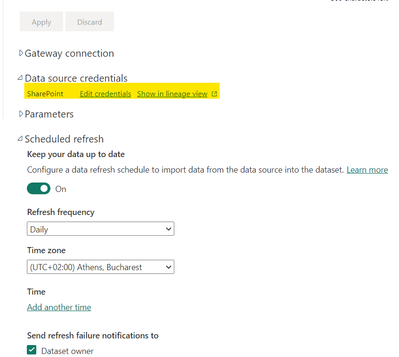
I am having trouble configuring a scheduled refresh for my dashboard. It reports that the data has been refreshed (both in the data set and the report), but it isn't accurate and there is no change to the data in the dashboard. I can only get it working when I manually refresh it in the desktop app and republish the data to the service.

My data source credentials are excel sheets in SharePoint that I configure for a daily refresh.


TalV_0-1672147056983.png


Would you be able to help me understand why the dashboard data doesn't refresh? Let me know if you need any further information. 


Thanks,

Tal


1 ACCEPTED SOLUTION
ouaelaam
Resolver I
Resolver I

Hi,
You need to specify a time :
Under Time click on "Add another time", then choose a time for the refresh.
Then click on "Apply".

The dataset will then refresh Daily at the time you specify. You can add additional times if you want it to refresh multiple times per day.

View solution in original post

1 REPLY 1
ouaelaam
Resolver I
Resolver I

Hi,
You need to specify a time :
Under Time click on "Add another time", then choose a time for the refresh.
Then click on "Apply".

The dataset will then refresh Daily at the time you specify. You can add additional times if you want it to refresh multiple times per day.

Helpful resources

Announcements
Join our Fabric User Panel

Join our Fabric User Panel

Share feedback directly with Fabric product managers, participate in targeted research studies and influence the Fabric roadmap.

March Power BI Update Carousel

Power BI Community Update - March 2026

Check out the March 2026 Power BI update to learn about new features.