cancel
Showing results for 
Search instead for 
Did you mean: 

The Power BI Data Visualization World Championships is back! Get ahead of the game and start preparing now! Learn more

Reply
jnail923
Frequent Visitor

Salesforce Refresh - Data Source Credential error

I've got two Salesforce sources in our data set - Objects & Custom Report. The credentials for Objects is accepted, but I receive an error when inputting credentials for the report-detail (classInfo). We've had this data set refreshing for over a year, and just received this error 2 weeks ago. I had to remove the custom report from our data set, so we could continue refreshing.


Pictures of Error


3 REPLIES 3
ReportMaster
Post Partisan
Post Partisan

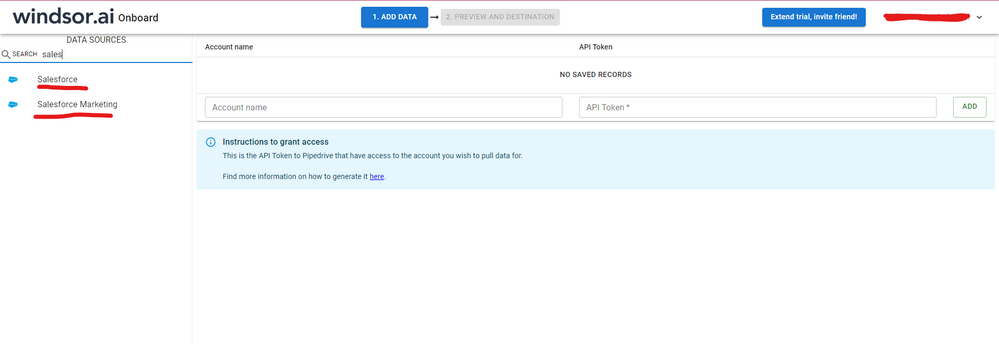
Hi @jnail923 were you able to find a solution? As a workaround, maybe you can try to test your connection with a 3rd party connector. I've tried windsor.ai, supermetrics and funnel.io. I stayed with windsor because it is much cheaper so just to let you know other options. In case you wonder, to make the connection first search for the Salesforce connector in the data sources list:


SALESFORCE-1.png


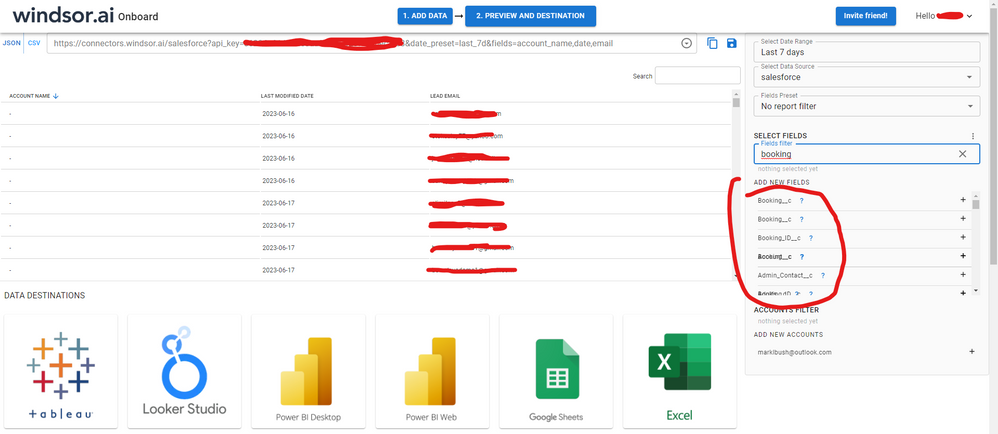
After that, just grant access to your Salesforce account using your credentials, then on preview and destination page you will see a preview of your Salesforce fields:


SALESFORCE-2.png


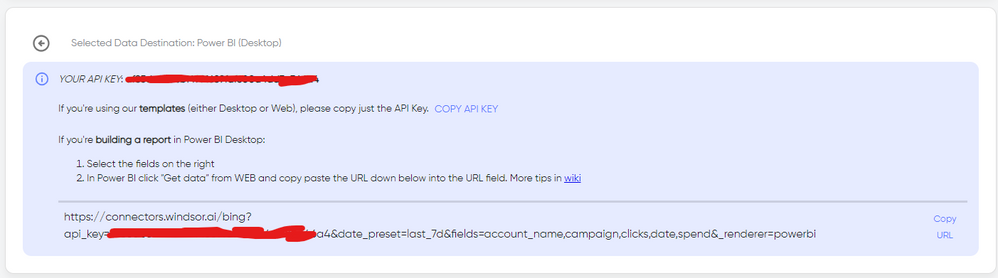
There just select the fields you need. It is also compatible with custom fields and custom objects, so you'll be able to export them through windsor.  Finally, just select PBI as your data destination and finally just copy and paste the url on PBI --> Get Data --> Web --> Paste the url. 


SELECT_DESTINATION_NEW.png

v-frfei-msft
Community Support
Community Support

Hi @jnail923,


Based on my research, the issue should be a known issue. Once updated, I will post back asap. Also you can keep an eye on that.


Capture.PNG


Regards,

Frank

Community Support Team _ Frank
If this post helps, then please consider Accept it as the solution to help the others find it more quickly.

Hi @jnail923,


The issue has been solved now. Could you please have a check? Feel free to let me know if any other question. And kindly mark my answer as a solution if solved.


Regards,

Frank

Community Support Team _ Frank
If this post helps, then please consider Accept it as the solution to help the others find it more quickly.

Helpful resources

Announcements
Power BI DataViz World Championships

Power BI Dataviz World Championships

The Power BI Data Visualization World Championships is back! Get ahead of the game and start preparing now!

December 2025 Power BI Update Carousel

Power BI Monthly Update - December 2025

Check out the December 2025 Power BI Holiday Recap!

FabCon Atlanta 2026 carousel

FabCon Atlanta 2026

Join us at FabCon Atlanta, March 16-20, for the ultimate Fabric, Power BI, AI and SQL community-led event. Save $200 with code FABCOMM.