This time we’re going bigger than ever. Fabric, Power BI, SQL, AI and more. We're covering it all. You won't want to miss it.
Learn moreDid you hear? There's a new SQL AI Developer certification (DP-800). Start preparing now and be one of the first to get certified. Register now
We've implemented Always Encrypted in our SQL Server 2016 database. Using Always Encrypted we encrypt a column X.
Using a .NET DirectQuery connection we decrypt the data in SSAS (a tabular model). The decryption works. Next step, we use a live connection from PowerBI to the Tabular model. The data is shown decrypted in PowerBI, so that works. However: we cannot filter on a column with encryption enabled. If we filter (in a filter of a visual) column X in PowerBI we receive an error. This error occurs in both ways of database encryption (Deterministic and Randomized).
If we change the SSAS tabular .NET connnection from DirectQuery to Import the filtering works in PowerBI. This is not our ideal solution because we only want to store the data in the database, and not in the SSAS tabular model and/or in PowerBI.
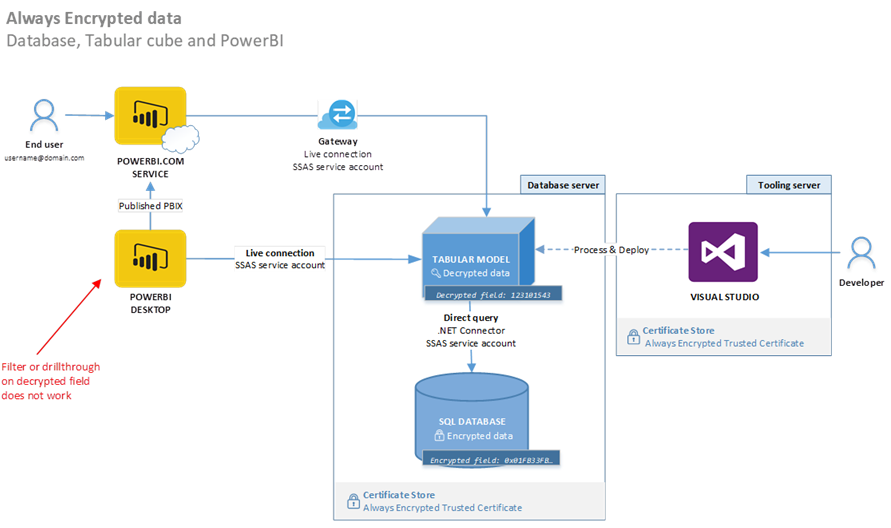
This is the model:
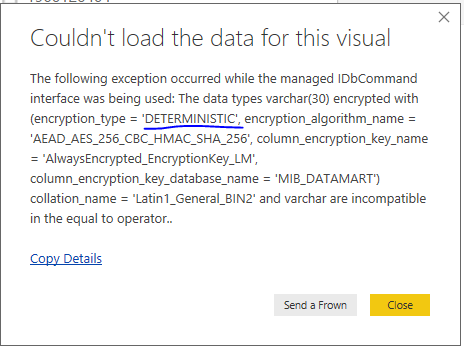
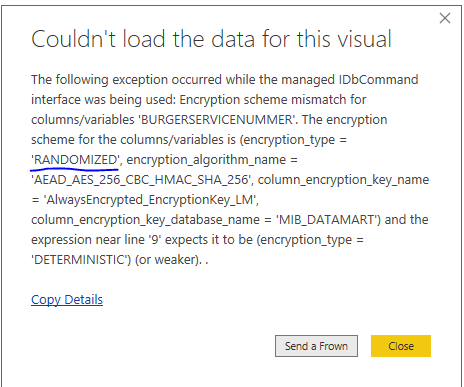
These are the errors that occur:
Deterministic encryption - error
Randomized encryption - error
Does anyone have a solution for this problem or an explanation why this does not work?
We've implemented Always Encrypted in our SQL Server 2016 database. Using Always Encrypted we encrypt column X.
Using a .NET DirectQuery connection we decrypt the data in SSAS (a tabular model). The decryption works. Next step, we use a live connection from PowerBI to the SSAS tabular model. The data is shown decrypted in PowerBI, so that works. However: we cannot filter on a column with encryption enabled. If we filter (in a filter of a visual) column X in PowerBI Desktop we receive an error. This error occurs in both ways of database encryption (Deterministic and Randomized).
If we change the SSAS tabular .NET connnection from [DirectQuery] to [Import] the filtering works in PowerBI. However, this is not our ideal solution because we only want to store the data - encrypted - in the database, and not - decrypted - in the SSAS tabular model and/or in PowerBI.
This is the model:
These are the errors that occur:
Randomized encryption - error
Does anyone have a solution for this problem or an explanation (based on documentation) why this does not work?
Deterministic encryption - error
Hi @Anonymous,
Please refer to use-always-encrypted-data-with-ssas-and-power-bi/, sql-server-2016-always-encription-features and with-always-encrypted.
Best Regards,
Dale
Hi Dale,
Thanks for your comment. I've added the links as background info. Unfortunately, those articles do not provide the solution.
Hi,
unfortunately links seems to be unrelated as usual, have you guys find a solution yet?
We are aiming for a PaaS solution but I can not seem to be finding a solution. I have been thinking about Power Query M data connector with ODBC driver but it will take time and I am trying to avoid it. Please let us know if you find out anything useful.
Thanks!
Check out the April 2026 Power BI update to learn about new features.
Sign up to receive a private message when registration opens and key events begin.
If you have recently started exploring Fabric, we'd love to hear how it's going. Your feedback can help with product improvements.
| User | Count |
|---|---|
| 10 | |
| 8 | |
| 7 | |
| 7 | |
| 7 |
| User | Count |
|---|---|
| 49 | |
| 27 | |
| 21 | |
| 20 | |
| 20 |