cancel
Showing results for 
Search instead for 
Did you mean: 

The Power BI Data Visualization World Championships is back! Get ahead of the game and start preparing now! Learn more

Reply
Anonymous
Not applicable

Row Level Security Question

I have a very simple report that is comprised of two fact tables and a dimension table. The dimension table is just a list of about 10 team names and each fact table has a team name column.


I set up a role for each Team, filtering the dimension table by that team name, published the report then linked each role to an Azure AD group.


This is fine if a person is only in one of the groups. If a person is in two groups, they don't see the data for the two groups in the report, they get an error like: The query encountered security filters on a table relationship that cannot be reconciled for the current user.


How can I have it so a member of more than one group can see the data for each group they are in without setting up explicit roles for those people and creating special AD groups for them? Like it needs to be an OR operation that combines the filters for each role or something?


I'd rather use the existing groups in Azure AD than create new ones just for the security filtering of this one report, but I know if it come to it I can do that, I just want to know the best practice in this scenario, or if I'm doing something wrong with the way I set up the roles.

1 ACCEPTED SOLUTION
v-yanjiang-msft
Community Support
Community Support

Hi @Anonymous ,

According to your description, I create a sample and reproduce your problem.

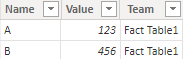
Fact Table1:

vkalyjmsft_0-1650624031552.png

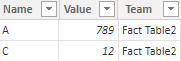
Fact Table2:

vkalyjmsft_1-1650624091513.png

Dimension table:

vkalyjmsft_2-1650624106670.png

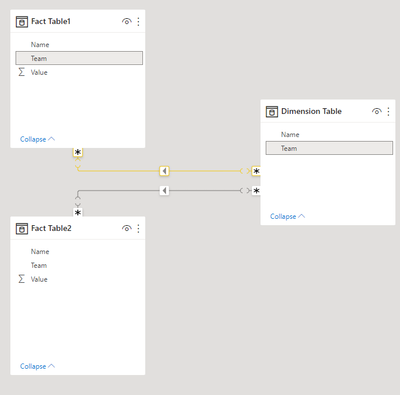
If you make relationship between Fact table and dimension table, and filter the dimension table by that team name, the error will occur as you say.

vkalyjmsft_3-1650624274448.png

Here's my solution.

1.Create a team table listing all the teams.

vkalyjmsft_4-1650624488686.png

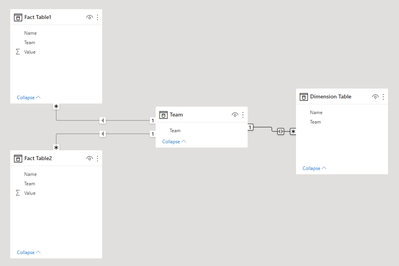
2.Make relationship like this:

vkalyjmsft_6-1650624686698.png

Fact table and Team table should be single direction, Team table and Dimension table should be both direction, but unselect the "Apply security filter in both directions".


vkalyjmsft_5-1650624654608.png

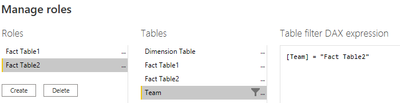
3.In manage roles, filter the Team table by the team name.

vkalyjmsft_7-1650624886004.png

vkalyjmsft_8-1650624899034.png


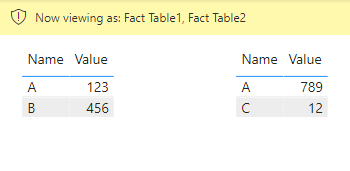
Get the result correctly both in Desktop and Service.

vkalyjmsft_10-1650625045040.png

I attach the sample below for reference.


Best Regards,
Community Support Team _ kalyj

If this post helps, then please consider Accept it as the solution to help the other members find it more quickly.

View solution in original post

2 REPLIES 2
v-yanjiang-msft
Community Support
Community Support

Hi @Anonymous ,

According to your description, I create a sample and reproduce your problem.

Fact Table1:

vkalyjmsft_0-1650624031552.png

Fact Table2:

vkalyjmsft_1-1650624091513.png

Dimension table:

vkalyjmsft_2-1650624106670.png

If you make relationship between Fact table and dimension table, and filter the dimension table by that team name, the error will occur as you say.

vkalyjmsft_3-1650624274448.png

Here's my solution.

1.Create a team table listing all the teams.

vkalyjmsft_4-1650624488686.png

2.Make relationship like this:

vkalyjmsft_6-1650624686698.png

Fact table and Team table should be single direction, Team table and Dimension table should be both direction, but unselect the "Apply security filter in both directions".


vkalyjmsft_5-1650624654608.png

3.In manage roles, filter the Team table by the team name.

vkalyjmsft_7-1650624886004.png

vkalyjmsft_8-1650624899034.png


Get the result correctly both in Desktop and Service.

vkalyjmsft_10-1650625045040.png

I attach the sample below for reference.


Best Regards,
Community Support Team _ kalyj

If this post helps, then please consider Accept it as the solution to help the other members find it more quickly.

lbendlin
Super User
Super User

RLS comes in two flavors, static and dynamic.  Have you decided yet which of these you want to implement?

Helpful resources

Announcements
Power BI DataViz World Championships

Power BI Dataviz World Championships

The Power BI Data Visualization World Championships is back! Get ahead of the game and start preparing now!

December 2025 Power BI Update Carousel

Power BI Monthly Update - December 2025

Check out the December 2025 Power BI Holiday Recap!

FabCon Atlanta 2026 carousel

FabCon Atlanta 2026

Join us at FabCon Atlanta, March 16-20, for the ultimate Fabric, Power BI, AI and SQL community-led event. Save $200 with code FABCOMM.