Join us at FabCon Atlanta from March 16 - 20, 2026, for the ultimate Fabric, Power BI, AI and SQL community-led event. Save $200 with code FABCOMM.
Register now!The Power BI Data Visualization World Championships is back! Get ahead of the game and start preparing now! Learn more
Good Day,
I am setting up a new env and selecting an EC2 instance for On-Prem Gateway & PowerBI Dev for sources (AWS RDS, Redshift & API)
Best Practise (8 CPU, 8GB RAM, 64-bit WinServer, SSD, multiple GB network)
I want to select "t3.2xlarge" as I don't necessarily want multiple EC2 for Dev & Gateway but due to cost.
Due to me experimenting with Airflow and Python for sql scripts & api calls, I thought i could use this to stop and start the EC2 instance to reduce the cost, however chatgpt states the On-Prem gateway would need to be manually started to become online
When an Amazon EC2 instance running the Power BI Gateway is stopped and then started again, the Power BI Gateway service on that instance will need to be manually started for it to go online. The Power BI Gateway service does not automatically restart when the EC2 instance is started.
Kindly advise if this is true and if anyone else tried this solution im thinking or has a better plan please?
| t3.xlarge | $0.256 | 4 | 16 GiB | EBS Only | Up to 5 Gigabit | $190 |
| t3.2xlarge | $0.512 | 8 | 32 GiB | EBS Only | Up to 5 Gigabit | $373 |
Solved! Go to Solution.
Hi @icassiem
You can try the following:
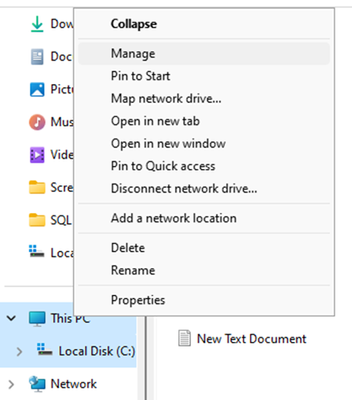
1. Open "Services" as shown in the screenshot.
2. Locate the On-Premise Data Gateway Service or a similarly named service in the Services application.
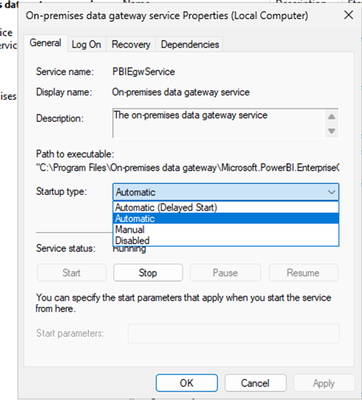
3. Right-click the service and select Properties.
4. In the Properties window, set the Startup type to Automatic.
5. Click OK to save the changes.
Best Regards,
Community Support Team _Yuliax
If this post helps, then please consider Accept it as the solution to help the other members find it more quickly.
Hi @icassiem
You can try the following:
1. Open "Services" as shown in the screenshot.
2. Locate the On-Premise Data Gateway Service or a similarly named service in the Services application.
3. Right-click the service and select Properties.
4. In the Properties window, set the Startup type to Automatic.
5. Click OK to save the changes.
Best Regards,
Community Support Team _Yuliax
If this post helps, then please consider Accept it as the solution to help the other members find it more quickly.
Thank You Very Much v-xuxinyi-msft
I tested this by restarting my existing legacy instance and the On-Prem services were running 🙂
Is it worth all the effort of having a python job to stop/start the inst or should i just go for the lesser inst
t3.xlarge" ? |
Hi,
Any Help, please?
1. Does the On-Prem come on-line after EC2 instance stop and Start
2. Is it worth all the effort of having a python job to stop/start the instance or should i just go for the lesser instance "
t3.xlarge" ?
Regards |
The Power BI Data Visualization World Championships is back! Get ahead of the game and start preparing now!
Check out the November 2025 Power BI update to learn about new features.