

cancel
Showing results for 
Search instead for 
Did you mean: 

Level up your Power BI skills this month - build one visual each week and tell better stories with data! Get started

Reply
Winniethewinner
Helper IV
Helper IV

Report Usage Metrics Report - "new usage report on/off" button

Hi there, 

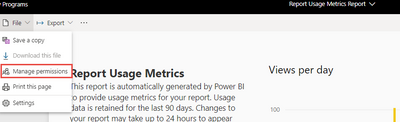
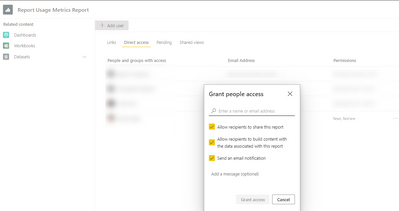
I'm the Workspace admin, and have granted one of the users the permission to see this usage metrics report by clicking "Manage permission", and then add users:

2022-09-09_13-45-53.png 

2022-09-09_13-51-31.png


My question is: why he/she is not able to see this "New usage report on/off" button? 

Winniethewinner_0-1662746016421.png

Thanks. 

1 ACCEPTED SOLUTION
Anonymous
Not applicable

Hi @Winniethewinner ,


The purpose of the button is to toggle between the new or old presentation of the usage report, so the button does not exist after sharing the report.


vmengzhumsft_0-1662961598121.png


If you want users to have this functionality as well, you can simply give them edit access to the original report (not the usage report) and let them manually go through the report usage.


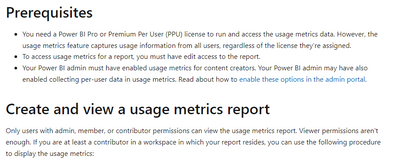
At the same time, notice these limitations to make sure user can "view uasge metric report":

vmengzhumsft_1-1662961627144.png

Related link:

Monitor usage metrics in workspaces (preview) - Power BI | Microsoft Docs


Best regards,

Community Support Team Selina zhu

If this post helps, then please consider Accept it as the solution to help the other members find it more quickly


View solution in original post

1 REPLY 1
Anonymous
Not applicable

Hi @Winniethewinner ,


The purpose of the button is to toggle between the new or old presentation of the usage report, so the button does not exist after sharing the report.


vmengzhumsft_0-1662961598121.png


If you want users to have this functionality as well, you can simply give them edit access to the original report (not the usage report) and let them manually go through the report usage.


At the same time, notice these limitations to make sure user can "view uasge metric report":

vmengzhumsft_1-1662961627144.png

Related link:

Monitor usage metrics in workspaces (preview) - Power BI | Microsoft Docs


Best regards,

Community Support Team Selina zhu

If this post helps, then please consider Accept it as the solution to help the other members find it more quickly


Helpful resources

Announcements
April Power BI Update Carousel

Power BI Monthly Update - April 2026

Check out the April 2026 Power BI update to learn about new features.

Fabric SQL PBI Data Days

Data Days 2026 coming soon!

Sign up to receive a private message when registration opens and key events begin.

New to Fabric survey Carousel

New to Fabric Survey

If you have recently started exploring Fabric, we'd love to hear how it's going. Your feedback can help with product improvements.

Power BI DataViz World Championships carousel

Power BI DataViz World Championships - June 2026

A new Power BI DataViz World Championship is coming this June! Don't miss out on submitting your entry.