We've captured the moments from FabCon & SQLCon that everyone is talking about, and we are bringing them to the community, live and on-demand. Starts on April 14th. Register now
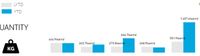
I have tried endless times to remove letters from unit in a regular bar chart and I can't seem to find a solution - it is freak*** annoying! This is Danish btw., but I seem to have the issue with english as well.
Also, I am using an OLAP Cube connection, so I am kinda restricted.
Hi @Anonymous,
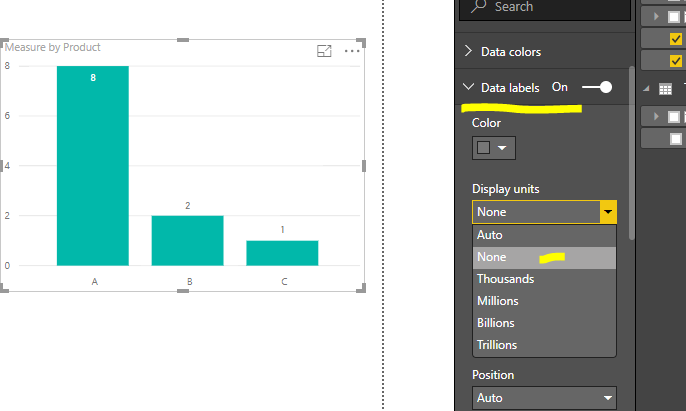
Did you try to set the option to None?
Regards,
Frank
Hi @v-frfei-msft,
Tried that, but the data is shown in kilogram - I want to show data labels in tons, which is why I choose "Thousands", but I don't want the text afterward.
Instead, I just insert a text-box in the top, explaining that all data shown is in tons!
Hi @Anonymous,
Maybe you can try to create a new calculated column to work on it.
Tons = table[your column]/1000
Regards,
Frank
Hi @v-frfei-msft,
To my knowledge that is not possible when you work with an OLAP live cube connection, I miss a lot of flexibility!
We are working on a tabular model, which allows me to do new calculated fields, but as long as we're working with the current connection, that's not an option (at least to my knowledge!).
Thank you anyway, Frank!
Hi @Anonymous,
How about creating a measure instead of calculated column?
Regards,
Frank
Hi @v-frfei-msft,
I can't do that either, so guess I will have to wait until we have the tabular model ready..
If you have recently started exploring Fabric, we'd love to hear how it's going. Your feedback can help with product improvements.
A new Power BI DataViz World Championship is coming this June! Don't miss out on submitting your entry.
Share feedback directly with Fabric product managers, participate in targeted research studies and influence the Fabric roadmap.