cancel
Showing results for 
Search instead for 
Did you mean: 

Next up in the FabCon + SQLCon recap series: The roadmap for Microsoft SQL and Maximizing Developer experiences in Fabric. All sessions are available on-demand after the live show. Register now

Reply
Anonymous
Not applicable

Refreshing In Power BI Service using Dataflow slower than Import SQL Statement

I'm a Pro user and struggling to see the benefit of Dataflows for my SQL Server data.  

I've created two reports with exactly the same tables.  One relies on SQL statements imported into the model via a gateway.  The other has the same tables with the same queries from a Dataflow that was refreshed over the gateway previously (this takes about 3 minutes).

SQL Dataflow Refresh.png

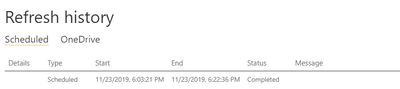
 The dataset refresh based just on the dataflow data sources takes just over 19 minutes to finish

All Dataflow Dataset Refresh.png


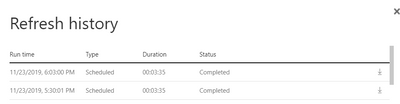
The dataset based on the SQL import statement takes just under 6 minutes.


SQL Import refresh.png


I thought the idea was if it was consuming the data from an already refreshed dataflow it would be much quicker.  At least that's what this article alludes to:  https://radacad.com/how-to-use-dataflow-to-make-the-refresh-of-power-bi-solution-faster 

So, either I'm doing something wrong or there is some other problem.    I don't know if the gateway set up has something to do with it (I can't see how as I'm not crossing it to refresh the dataset from a Dataflow).  Anyone know what the optium requirements are for the server the gateway sits on if that's the case?  


Many thanks

1 ACCEPTED SOLUTION
venal
Memorable Member
Memorable Member

@Anonymous 

May i know the Gateway you are using? (On-Premises/Personal)

Is the Gateway is older or latest verison?

If it is the older version, please try to upgrade to the latest version.

https://www.microsoft.com/en-us/download/details.aspx?id=53127

I would like to suggest you to keep monitor this week and if the issue is persists with the perfromance, please raise a ticket.

Because there was few known issues going on with Data Flows, those bugs deploy it in this weekend.

Please refer the support page for known issues.

https://powerbi.microsoft.com/en-us/support/

If you have any concerns, please let us know.


If this post helps, then please consider Accept it as the solution to help the other members find it more
If this post was helpful may I ask you to mark it as solution and click on thumb symbol?


View solution in original post

3 REPLIES 3
venal
Memorable Member
Memorable Member

@Anonymous 

May i know the Gateway you are using? (On-Premises/Personal)

Is the Gateway is older or latest verison?

If it is the older version, please try to upgrade to the latest version.

https://www.microsoft.com/en-us/download/details.aspx?id=53127

I would like to suggest you to keep monitor this week and if the issue is persists with the perfromance, please raise a ticket.

Because there was few known issues going on with Data Flows, those bugs deploy it in this weekend.

Please refer the support page for known issues.

https://powerbi.microsoft.com/en-us/support/

If you have any concerns, please let us know.


If this post helps, then please consider Accept it as the solution to help the other members find it more
If this post was helpful may I ask you to mark it as solution and click on thumb symbol?


Anonymous
Not applicable

Thanks.  It's an enterprise gateway and we upgraded it this morning.

I will keep testing it and see what times we get.


@Anonymous 

Hope it is working fine now.

If you have any queries, please let us know.


If this post helps, then please consider Accept it as the solution to help the other members find it more
If this post was helpful may I ask you to mark it as solution and click on thumb symbol?

Helpful resources

Announcements
New to Fabric survey Carousel

New to Fabric Survey

If you have recently started exploring Fabric, we'd love to hear how it's going. Your feedback can help with product improvements.

Power BI DataViz World Championships carousel

Power BI DataViz World Championships - June 2026

A new Power BI DataViz World Championship is coming this June! Don't miss out on submitting your entry.

Join our Fabric User Panel

Join our Fabric User Panel

Share feedback directly with Fabric product managers, participate in targeted research studies and influence the Fabric roadmap.

March Power BI Update Carousel

Power BI Community Update - March 2026

Check out the March 2026 Power BI update to learn about new features.

Top Solution Authors