cancel
Showing results for 
Search instead for 
Did you mean: 

Next up in the FabCon + SQLCon recap series: The roadmap for Microsoft SQL and Maximizing Developer experiences in Fabric. All sessions are available on-demand after the live show. Register now

Reply
Anonymous
Not applicable

Refresh via API?

Hi all,


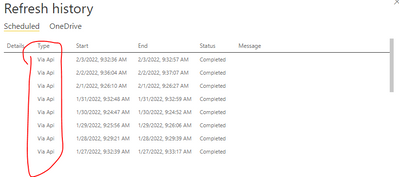
I am aware that I can set a scheduled refresh on my Power BI reports in Power BI service. But when looking at reports of a friend of mine who works at another company, I saw that his reports refreshed "via API" (see screenshot below). I am only aware of the "Scheduled" type. 


How can you set something like this up? Because this seems to be far more consistent than just the scheduled refresh in Power BI service. 


commodity_check_0-1643907277648.png


1 ACCEPTED SOLUTION
tackytechtom
Most Valuable Professional

Hi @Anonymous ,


I wrote a couple of blog posts about that exact topic on how to refresh entire datasets. tables and even partitions via API from data factory and azure function:


https://www.tackytech.blog/how-to-refresh-power-bi-datasets-from-data-factory-with-managed-identity/

https://www.tackytech.blog/how-to-refresh-individual-tables-or-partitions-in-power-bi-dataset-from-data-factory/

https://www.tackytech.blog/how-to-refresh-power-bi-datasets-tables-and-partitions-with-azure-functions/


Otherwise I can highly recommend Microsoft Documentation on this:
Datasets - Refresh Dataset - REST API (Power BI Power BI REST APIs) | Microsoft Docs


Hope this helps!


/Tom

https://www.tackytech.blog

https://www.instagram.com/tackytechtom


Did I answer your question➡️ Please, mark my post as a solution ✔️

Also happily accepting Kudos 🙂

Feel free to connect with me on LinkedIn! linkedIn

#proudtobeasuperuser 

View solution in original post

1 REPLY 1
tackytechtom
Most Valuable Professional

Hi @Anonymous ,


I wrote a couple of blog posts about that exact topic on how to refresh entire datasets. tables and even partitions via API from data factory and azure function:


https://www.tackytech.blog/how-to-refresh-power-bi-datasets-from-data-factory-with-managed-identity/

https://www.tackytech.blog/how-to-refresh-individual-tables-or-partitions-in-power-bi-dataset-from-data-factory/

https://www.tackytech.blog/how-to-refresh-power-bi-datasets-tables-and-partitions-with-azure-functions/


Otherwise I can highly recommend Microsoft Documentation on this:
Datasets - Refresh Dataset - REST API (Power BI Power BI REST APIs) | Microsoft Docs


Hope this helps!


/Tom

https://www.tackytech.blog

https://www.instagram.com/tackytechtom


Did I answer your question➡️ Please, mark my post as a solution ✔️

Also happily accepting Kudos 🙂

Feel free to connect with me on LinkedIn! linkedIn

#proudtobeasuperuser 

Helpful resources

Announcements
New to Fabric survey Carousel

New to Fabric Survey

If you have recently started exploring Fabric, we'd love to hear how it's going. Your feedback can help with product improvements.

Power BI DataViz World Championships carousel

Power BI DataViz World Championships - June 2026

A new Power BI DataViz World Championship is coming this June! Don't miss out on submitting your entry.

Join our Fabric User Panel

Join our Fabric User Panel

Share feedback directly with Fabric product managers, participate in targeted research studies and influence the Fabric roadmap.

March Power BI Update Carousel

Power BI Community Update - March 2026

Check out the March 2026 Power BI update to learn about new features.

Top Solution Authors