Join us at FabCon Atlanta from March 16 - 20, 2026, for the ultimate Fabric, Power BI, AI and SQL community-led event. Save $200 with code FABCOMM.
Register now!The Power BI Data Visualization World Championships is back! Get ahead of the game and start preparing now! Learn more
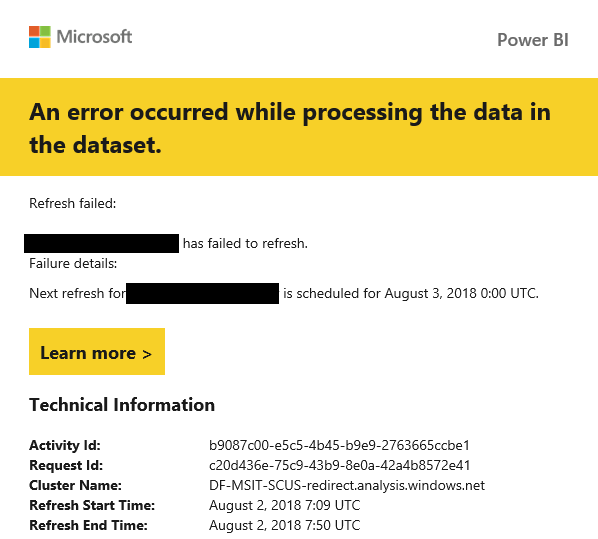
I get refresh failed emails with no useful data. There's a line that says "Failure details:" but it's blank. I have to dive into powerbi.com, navigate to my data set, click on 'schedule refresh', and then find the link for 'refresh history' to get a simple message as to why my refresh failed. This info should be in the email that is sent to me, instead of hidden a half mile down the stack.
HI @moody31415,
Unfortunable, current power bi not support custom subscription email and refresh failed email, maybe you can submit an idea for this requirement.
Regards,
Xiaoxin Sheng
This has nothing to do with custom emails. This is a bug in that it sends me an email with no useful details. The line for the reason why the refresh failed is blank. This is clearly a bug.
Example email:
Hi @moody31415,
Nope, current refresh failed notice email not include detail error message, you need to check them on service side.
I'd like to suggest you submit an idea for this requirement.
Regards,
Xiaoxin Sheng
The Power BI Data Visualization World Championships is back! Get ahead of the game and start preparing now!
| User | Count |
|---|---|
| 56 | |
| 56 | |
| 35 | |
| 18 | |
| 14 |