cancel
Showing results for 
Search instead for 
Did you mean: 

The Power BI Data Visualization World Championships is back! Get ahead of the game and start preparing now! Learn more

Reply
Anonymous
Not applicable

Refresh failed: Invalid connection credentials

Hi,

In my Power BI Report, I am using SQL server as Data Source and this is hosted on Azure. In Power BI Desktop, I am able to connect with server and retrieve data as well. I also tested connection by SSMS which is successful. I published this report and tried to refresh on Power BI service. But this time DataSet is not refreshed and error is "Invalid connection credentials".

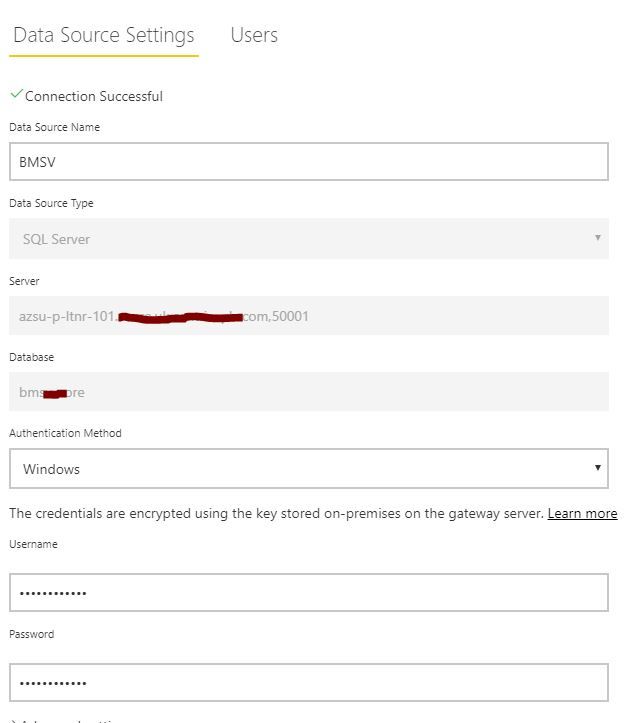
I checked Data Source setting in Gateway and there connection is Successful.

Tried multiple ways but not able to refresh on Power BI app. Please advice what I need to do to fix this issue.


Capture.JPG

5 REPLIES 5
Anonymous
Not applicable

HI @Anonymous,


How did you host your database? On premise sql database install in azure VM or azure sql database? 


If you mean on premise SQL install in azure VM, you need to use gateway to manage this datasource.


If you mean azure sql data source, you only need to update your credentials on service side. ('settings -> datasets -> data source credentials')


Regards,

Xiaoxin Sheng

Anonymous
Not applicable

 Hi @Anonymous

Thanks for your response.

Database is on premise SQL which install in azure VM. For schedule refresh, I have created cluster gateway on Power BI app and add Data Source under Gateway. Test Connection is successful for this Data Source but when we are trying to refresh/schedule refresh, this gives error as I mentioned. 

Anonymous
Not applicable

Hi @Anonymous,


Can you please share a snapshot of your datasource setting and gateway connection?


If you have multiple available gateways, please double check on your dataset setting to confirm which gateway you used to handle the refresh operation of that  dataset.


Regards,

Xiaoxin Sheng

Anonymous
Not applicable

Hi @Anonymous

screenshot -

Data Source SettingData Source SettingGateway SettingGateway Setting

Anonymous
Not applicable

Hi @Anonymous,


I mean gateway connection and data source credentials at 'settings -> datasets'.

6.PNG


In addition, is there any advanced operation in your query? (e.g. merge, append, combine, invoke custom functions...)


Regards,

Xiaoxin Sheng

Helpful resources

Announcements
Power BI DataViz World Championships

Power BI Dataviz World Championships

The Power BI Data Visualization World Championships is back! Get ahead of the game and start preparing now!

December 2025 Power BI Update Carousel

Power BI Monthly Update - December 2025

Check out the December 2025 Power BI Holiday Recap!

FabCon Atlanta 2026 carousel

FabCon Atlanta 2026

Join us at FabCon Atlanta, March 16-20, for the ultimate Fabric, Power BI, AI and SQL community-led event. Save $200 with code FABCOMM.