cancel
Showing results for 
Search instead for 
Did you mean: 

We've captured the moments from FabCon & SQLCon that everyone is talking about, and we are bringing them to the community, live and on-demand. Starts on April 14th. Register now

Reply
Roym
Helper IV
Helper IV

Refresh data from onedrive

I build a report in PBI desktop with the source Excel on my ondrive for business. When publishing the report to the cloud the report is working. But once I try to refresh the dataset I get this error 'Scheduled refresh is disabled because at least one data source is missing credentials. To start the refresh again, go to this dataset's settings page and enter credentials for all data sources. Then reactivate scheduled refresh.'.


What I found out is that in PBI desktop the source takes my c://.... and not the onedrive url directly. So most likely that is the problem. But I'm not sure how to change this without recreating my whole report. I tested to do get data on the PBI cloud and then make the connection to the onedrive and then the refresh works. Hopefully anyone has an idea on how to fix this without re-creating my whole report again 🙂 Thanks!

1 ACCEPTED SOLUTION

Hi. You need to find the weburl or the excel file to replace the "C\\" and change the method File.Contents to Web.Content. The following post explains it:
https://blog.ladataweb.com.ar/post/185337134590/alternativa-para-conectar-power-bi-a-onedrive

I hope that helps,


If this post helps, then please consider Accept it as the solution to help the other members find it more quickly.

Happy to help!

LaDataWeb Blog

View solution in original post

6 REPLIES 6
jennratten
Super User
Super User

Hello - behind the scenes, OneDrive is a Sharepoint document library, so you can use the Sharepoint connector.  This is how I retrieve the content from an Excel that I saved in OneDrive but access through Sharepoint.


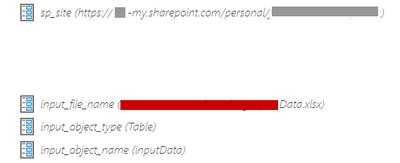
Note, the query steps below are parameterized for each updating and reproduction.

jennratten_0-1633611944258.png

The object_type is the Excel file object (Table, Sheet, etc).  The object name is is the name of the object selected in object type.  In this example I am wanting the content of a Table named InputData in an Excel file named (file name specified in input_file_name), which is saved in my OneDrive for Business folder.


  Source = SharePoint.Files(sp_site, [ApiVersion = 15]),
  get_file = Table.SelectRows(Source, each [Name] = input_file_name),
  Navigation = get_file{0}[Content],
  file_content = Excel.Workbook(Navigation, null, true),
  get_object = Table.SelectRows(file_content, each [Kind] = input_object_type and [Name] = input_object_name),
  object_content = get_object{0}[Data],


@jennratten Sorry, i'm not fully understanding it (yet). In my PBIX file I have two tables that come from Excel. Currently for both those tables when I go into the query editor the source is:


= Excel.Workbook(File.Contents("C:\Users\name\OneDrive - company.com\PowerBI\Report V3.xlsx"), null, true)


How do I need to adjust this?

You should go to the folder that contains the file, then right-click and click View Online.  That should open the file in the web.  Look in the address bar.  Get the text that appears before /_layouts and remove :u:/r/ from the middle.  That should be the path to use in the Sharepoint connector.

https://xxxxxxx-my.sharepoint.com/personal/yourname_xxxxxxx_com

Hi. You need to find the weburl or the excel file to replace the "C\\" and change the method File.Contents to Web.Content. The following post explains it:
https://blog.ladataweb.com.ar/post/185337134590/alternativa-para-conectar-power-bi-a-onedrive

I hope that helps,


If this post helps, then please consider Accept it as the solution to help the other members find it more quickly.

Happy to help!

LaDataWeb Blog

Thank you both for your help! with the guide from the website I was able to get it working! Thanks

Wonderful!

Helpful resources

Announcements
New to Fabric survey Carousel

New to Fabric Survey

If you have recently started exploring Fabric, we'd love to hear how it's going. Your feedback can help with product improvements.

Power BI DataViz World Championships carousel

Power BI DataViz World Championships - June 2026

A new Power BI DataViz World Championship is coming this June! Don't miss out on submitting your entry.

Join our Fabric User Panel

Join our Fabric User Panel

Share feedback directly with Fabric product managers, participate in targeted research studies and influence the Fabric roadmap.

March Power BI Update Carousel

Power BI Community Update - March 2026

Check out the March 2026 Power BI update to learn about new features.