Join us at FabCon Atlanta from March 16 - 20, 2026, for the ultimate Fabric, Power BI, AI and SQL community-led event. Save $200 with code FABCOMM.
Register now!Get Fabric Certified for FREE during Fabric Data Days. Don't miss your chance! Request now
Hi,
I have made RLS for departments, so some users can only see specific departments.
I wonder if users who are not included/defined in the RLS, but have access/permission to the APP (only app permission not workspace access), can see all the data in the report?
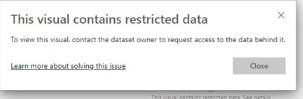
I have a case that a user who is not defined in RLS gets the message visuals containing restricted data.
Solved! Go to Solution.
It depends. It depends on how you implemented RLS. It depends on where RLS is applied in the data model, and what the rules are.
In your case RLS seems to cover the entire data model which leads to the sub-optimal user experience for the non-RLS user.
It depends. It depends on how you implemented RLS. It depends on where RLS is applied in the data model, and what the rules are.
In your case RLS seems to cover the entire data model which leads to the sub-optimal user experience for the non-RLS user.
Thanks for the answer: under the following assumptions, how can I test what the final experience will look like?
- RLS specified in the data set
- One or more reports in the same workspace, sharing a common dataset
- Premium by capacity workspace
- Published app
- Users added to the app and not directly to the workspace
In the workspace, select dataset security , then the ellipsis next to a role and "test as role" .
Or have a real user access the app and show you what they can see and what they cannot see.
Check out the November 2025 Power BI update to learn about new features.
Advance your Data & AI career with 50 days of live learning, contests, hands-on challenges, study groups & certifications and more!