Join us at FabCon Atlanta from March 16 - 20, 2026, for the ultimate Fabric, Power BI, AI and SQL community-led event. Save $200 with code FABCOMM.
Register now!Learn from the best! Meet the four finalists headed to the FINALS of the Power BI Dataviz World Championships! Register now
Hi,
Requiremnet here is we are sharing dataset across the organisation. we need to restrict the hirerachy level data for security purposes so can we acheive this. Tried using the traditonal RLS (creating roles and adding users to the roles) but when shared the dataset they can see all data. is there a way we can acheive this.
Thanks,
Manjunath
Solved! Go to Solution.
Hi @SaiManjunath ,
If you publish your Power BI Desktop report to a workspace in the Power BI service, the RLS roles are applied to members who are assigned to the Viewer role in the workspace. Even if Viewers are given Build permissions to the dataset, RLS still applies. For example, if Viewers with Build permissions use Analyze in Excel, their view of the data will be protected by RLS. Workspace members assigned Admin, Member, or Contributor have edit permission for the dataset and, therefore, RLS doesn’t apply to them. If you want RLS to apply to people in a workspace, you can only assign them the Viewer role. Read more about roles in workspaces.
For more details, you can read related document: Row-level security (RLS) with Power BI - Power BI | Microsoft Learn
Best regards,
Community Support Team_Binbin Yu
If this post helps, then please consider Accept it as the solution to help the other members find it more quickly.
Hi @SaiManjunath ,
If you publish your Power BI Desktop report to a workspace in the Power BI service, the RLS roles are applied to members who are assigned to the Viewer role in the workspace. Even if Viewers are given Build permissions to the dataset, RLS still applies. For example, if Viewers with Build permissions use Analyze in Excel, their view of the data will be protected by RLS. Workspace members assigned Admin, Member, or Contributor have edit permission for the dataset and, therefore, RLS doesn’t apply to them. If you want RLS to apply to people in a workspace, you can only assign them the Viewer role. Read more about roles in workspaces.
For more details, you can read related document: Row-level security (RLS) with Power BI - Power BI | Microsoft Learn
Best regards,
Community Support Team_Binbin Yu
If this post helps, then please consider Accept it as the solution to help the other members find it more quickly.
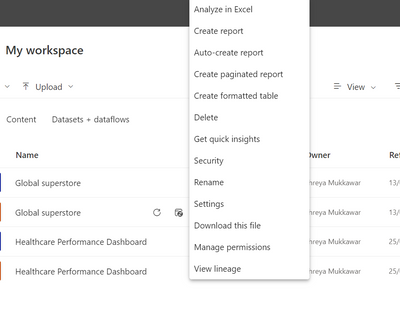
Go to Manage permission and from there you can add the RLS to your dataset.
Best Regards
Shreya
If this solution helps you then mark it as solution and give appriciate with kudos😊
Am trying to share the dataset (already published dataset which has RLS implemented) to other user so he can connect from his desktop to create his own report for analysis.
Share feedback directly with Fabric product managers, participate in targeted research studies and influence the Fabric roadmap.
Check out the February 2026 Power BI update to learn about new features.