Don't miss your chance to take the Fabric Data Engineer (DP-600) exam for FREE! Find out how by watching the DP-600 session on-demand now through April 28th.
Learn moreJoin the FabCon + SQLCon recap series. Up next: Power BI, Real-Time Intelligence, IQ and AI, and Data Factory take center stage. All sessions are available on-demand after the live show. Register now
Good afternoon,
I am asking for an advice on what is the best approch concerning the RLS for a multi "Branch" scenario.
Scenario:
I have a model where there is a fact table and then there are other tables related to the fact tables with the Dimension.
I have to set up a role where some users can see only some information of the fact table and the related dimension.
In particular we have different Branches and one user must see only some information of the fact table and "some information" of the dimensions. The branch field is present in all the tables and used for creating the keys used among the tables.
Is it the best approach to create a role for each Branch?
Is it the best approach create a table where the users are linked to the relative Branch and use this table to filter the roles?
Solved! Go to Solution.
Hi @thebigwhite ,
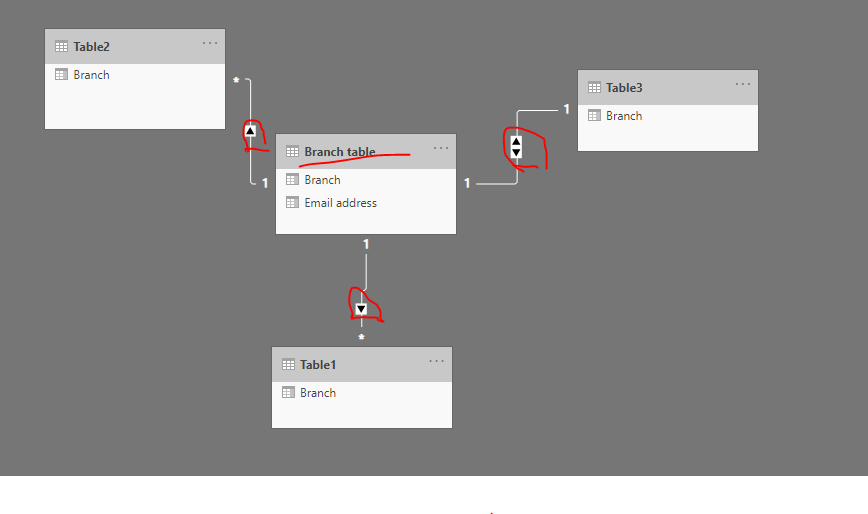
Try to create a model like this.
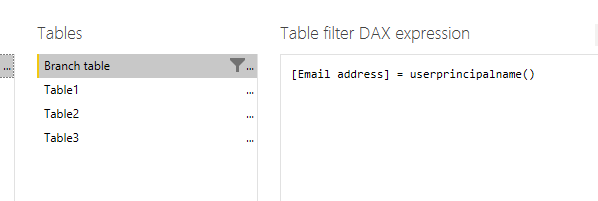
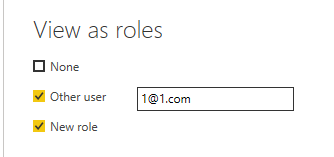
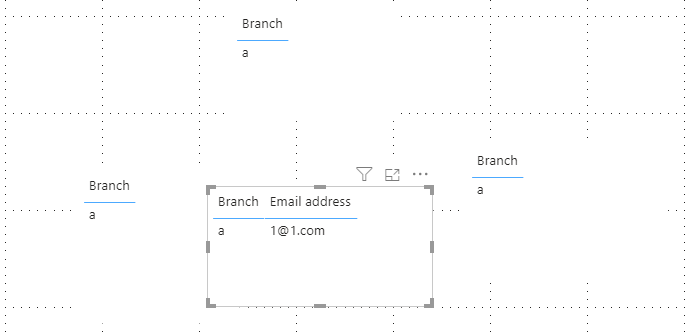
Then create a role on the 'Branch table'.
Best regards,
Lionel Chen
If this post helps, then please consider Accept it as the solution to help the other members find it more quickly.
Hi @thebigwhite ,
Try to create a model like this.
Then create a role on the 'Branch table'.
Best regards,
Lionel Chen
If this post helps, then please consider Accept it as the solution to help the other members find it more quickly.
It's not just the creation of the roles that you need to think about. You also need to think about the rules for each role, and to which table(s) to apply these rules.
Ideally you have an RLS reference table that sits at the top of the hierarchy (outermost shell of star/snowflake). In that case you may be able to apply the rules just to this one table, and then the data model can do the rest of the work.
Worst case you have to apply the rules to every single table. Not cool.
Check out the April 2026 Power BI update to learn about new features.
If you have recently started exploring Fabric, we'd love to hear how it's going. Your feedback can help with product improvements.
A new Power BI DataViz World Championship is coming this June! Don't miss out on submitting your entry.
| User | Count |
|---|---|
| 10 | |
| 10 | |
| 9 | |
| 7 | |
| 7 |
| User | Count |
|---|---|
| 43 | |
| 33 | |
| 27 | |
| 20 | |
| 19 |