This time we’re going bigger than ever. Fabric, Power BI, SQL, AI and more. We're covering it all. You won't want to miss it.
Learn moreLevel up your Power BI skills this month - build one visual each week and tell better stories with data! Get started
Hi All,
Happy Friday! I'm trying to figure out how to both get and update the receipient email addresses for this "Send refresh failure notification" field using the REST API. You would think the contacts info would be in the refresh schedule API, but it isn't...or maybe I'm missing something cause I'm pretty tired 😅 Looked at similar posts, didn't find one with a solution.
Thanks in advance!
Solved! Go to Solution.
Hi @PANDAmonium ,
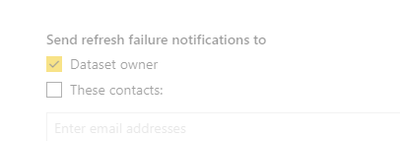
The first thing I want to say is that the easiest way to get and update the receipient email addresses like below without the rest api.
But at the moment I don't see anything about the api changing the email address sent to.
Datasets - Update Refresh Schedule - REST API (Power BI Power BI REST APIs) | Microsoft Docs
Best Regards,
Henry
If this post helps, then please consider Accept it as the solution to help the other members find it more quickly.
Hi @PANDAmonium ,
The first thing I want to say is that the easiest way to get and update the receipient email addresses like below without the rest api.
But at the moment I don't see anything about the api changing the email address sent to.
Datasets - Update Refresh Schedule - REST API (Power BI Power BI REST APIs) | Microsoft Docs
Best Regards,
Henry
If this post helps, then please consider Accept it as the solution to help the other members find it more quickly.
Hi Henry,
Thanks for the checking. But I was hoping to be able to automate part of the refresh schedule configuration and quickly generate a list of dataset owners/contacts. It's not a big deal though, just thought it'd be cool if someone knew how.
I couldn't find anything on it either. Only for sending notifications to my service principle that creates it which isn't helpful. So yeah, looks like it might not be possible for the time being. Thanks again!
Check out the April 2026 Power BI update to learn about new features.
Sign up to receive a private message when registration opens and key events begin.
If you have recently started exploring Fabric, we'd love to hear how it's going. Your feedback can help with product improvements.
| User | Count |
|---|---|
| 11 | |
| 8 | |
| 8 | |
| 7 | |
| 7 |
| User | Count |
|---|---|
| 50 | |
| 27 | |
| 24 | |
| 24 | |
| 22 |