cancel
Showing results for 
Search instead for 
Did you mean: 

Join the FabCon + SQLCon recap series. Up next: Power BI, Real-Time Intelligence, IQ and AI, and Data Factory take center stage. All sessions are available on-demand after the live show. Register now

Reply
KLJ
Helper I
Helper I

R script credentials

Hi


I have recently updated the April edition of the Data gateway personal edition.


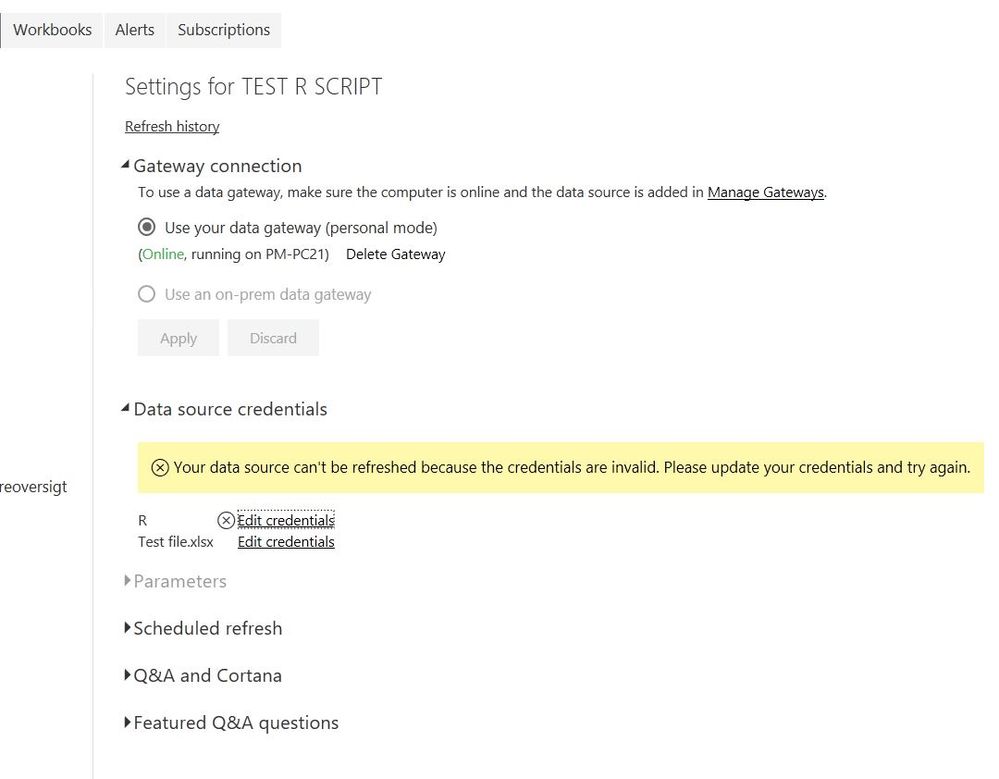
Now I have a problem with the credentials for R Script.


R 1.JPG

When I click on Edit credentials and then click Sign in this appears

R 2.JPG


I have tried to reinstall the gateway but no thing seems to work.


Any idea what is wrong?


Thanks


Best regards 

Kim

1 ACCEPTED SOLUTION

Hi


I tried to turn of custom connections in the gateway and it seems to help.


I hope Smiley Happy


Best regards 

Kim

View solution in original post

4 REPLIES 4
v-yuta-msft
Community Support
Community Support

Hi KLJ,


Are you using R visual in your report? Please update your PBI desktop to the lastest version and try again.


Regards,

Jimmy Tao

Hi Jimmy


No, I am using R srcipt to save data to a local file.

This is the my R script:


require(gdata)
write.table(trim(dataset), file="//Path-to-folder/TEST_PowerBi.txt", sep = "\t", row.names = FALSE, append = TRUE)
plot(dataset);


It all worked fine until I updated the Personal gateway to the april edition the other day.


My PBI desktop is Version: 2.57.5068.721 64-bit (april 2018)


Best regards 

Kim

Hi


I tried to turn of custom connections in the gateway and it seems to help.


I hope Smiley Happy


Best regards 

Kim

Anonymous
Not applicable

Hi, wondering if i can get some help.


Basically, i have some CSV's in a network folder.


I need to read these Csvs, in Power BI, transform them, and then right them back as new files to the same network folder. 


Im pulling my hair out, as I am using R to write the csv, but how do it to write the CSV in the power BI service? I have an on premise gateway and ive added tthe connection to the network folder and that works fine... 


whats the best way to go about this?

Helpful resources

Announcements
April Power BI Update Carousel

Power BI Monthly Update - April 2026

Check out the April 2026 Power BI update to learn about new features.

New to Fabric survey Carousel

New to Fabric Survey

If you have recently started exploring Fabric, we'd love to hear how it's going. Your feedback can help with product improvements.

Power BI DataViz World Championships carousel

Power BI DataViz World Championships - June 2026

A new Power BI DataViz World Championship is coming this June! Don't miss out on submitting your entry.

FabCon and SQLCon Highlights Carousel

FabCon &SQLCon Highlights

Experience the highlights from FabCon & SQLCon, available live and on-demand starting April 14th.