cancel
Showing results for 
Search instead for 
Did you mean: 

The Power BI Data Visualization World Championships is back! Get ahead of the game and start preparing now! Learn more

Reply
eliasrs
New Member

R Script error in Power BI but not on RStudio

Hello all.

Im trying to create an R Visual to plot a control chart within Power BI.

The script has been validated and runs on Rstudio (launched from power BI) but when I run it in Power BI I get the following error.


Error Message:
R script error.
Error in data.frame(TestDate, Meas) : object 'TestDate' not found
Execution halted


Looking though the forum found similar questions with no solution. Someone suggested to change R version, I have tried with 3.3.1 and 3.6.1 so far with exact samne results.


The script I'm trying to run is as follows.


# The following code to create a dataframe and remove duplicated rows is always executed and acts as a preamble for your script:
dataset <- data.frame(TestDate, Meas)
dataset <- unique(dataset)
# Paste or type your script code here:
library(qcc)
newdata <- dataset[order(dataset$TestDate),]
x <- c(newdata$TestDate)
s <- c(newdata$Meas)
qcc(s, type="xbar.one",nsigmas=3, labels=x)


Any ideas on how to solve this?


Regards


1 ACCEPTED SOLUTION
webportal
Impactful Individual

Hi,

The dataset dataframe is created automatically by Power BI, thus you don't need the following line of code:

dataset <- data.frame(TestDate, Meas)

If you can share the data or the pbix, perhaps I could be more helpful.

View solution in original post

7 REPLIES 7
webportal
Impactful Individual

Can you try this code:

library(qcc)
qcc(dataset["Meas"], type="xbar.one",nsigmas=3, labels=dataset["TestDate"])

Thanks for the susggestion but it didn't work

It actualy throws the error on the following line

dataset <- data.frame(TestDate, Meas) can't find object TestDate.
So, the dataset creation is not working.
 
I tried to adapat to DAX format (Q325[TestDate]) but id did not work.


webportal
Impactful Individual

Hi,

The dataset dataframe is created automatically by Power BI, thus you don't need the following line of code:

dataset <- data.frame(TestDate, Meas)

If you can share the data or the pbix, perhaps I could be more helpful.

Well, just commented the extra line idicated and it worked! this was the end script.


# The following code to create a dataframe and remove duplicated rows is always executed and acts as a preamble for your script:
dataset <- unique(dataset)
library(qcc)
newdata <- dataset[order(dataset$TestDate),]
x <- c(newdata$TestDate)
s <- c(newdata$Meas)
qcc(s, type="xbar.one",nsigmas=3, labels=x)
 
Thanks a lot.


webportal
Impactful Individual

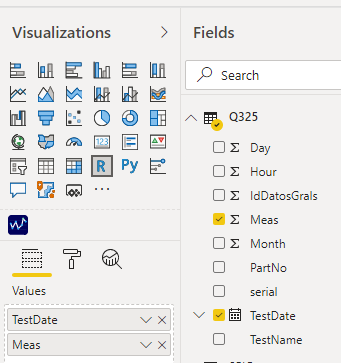
Have you added TestDate field to the values area of the R visual you're trying to create?

Yes, TestDate and Meas are added to Value field.


eliasrs_0-1595879373518.png


Thanks


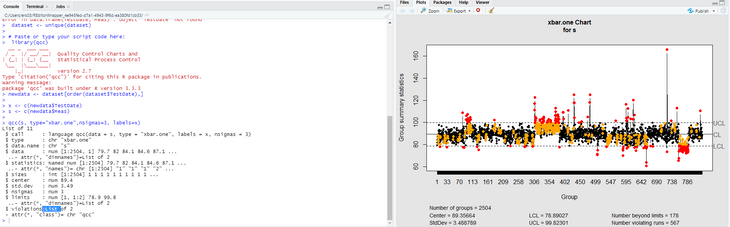
In Rstudio runs fine.


eliasrs_0-1595879716098.png


Helpful resources

Announcements
Power BI DataViz World Championships

Power BI Dataviz World Championships

The Power BI Data Visualization World Championships is back! Get ahead of the game and start preparing now!

December 2025 Power BI Update Carousel

Power BI Monthly Update - December 2025

Check out the December 2025 Power BI Holiday Recap!

FabCon Atlanta 2026 carousel

FabCon Atlanta 2026

Join us at FabCon Atlanta, March 16-20, for the ultimate Fabric, Power BI, AI and SQL community-led event. Save $200 with code FABCOMM.