cancel
Showing results for 
Search instead for 
Did you mean: 

The Power BI Data Visualization World Championships is back! Get ahead of the game and start preparing now! Learn more

Reply
Shubham10dulkar
Frequent Visitor

Query execution Failed for dataset - paginated report

Hi,

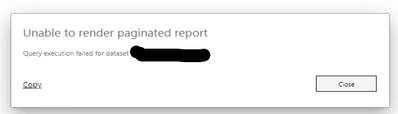
I have a paginated report which works fine on report builder but it doesn't work on service giving the following error.

Shubham10dulkar_0-1599978844533.png


Data Source: SSAS cube.

Gateway is configured and working well. Parameters are loading correctly.

When fetching reports it takes time and then it throws this error.


Can anyone please help me fix it.

5 REPLIES 5
v-xicai
Community Support
Community Support

Hi @Shubham10dulkar ,


If you still have this issue for Power BI, you'd better create a support ticket in Power BI Support , Scroll down and click "CREATE SUPPORT TICKET", to get further help.


Best Regards,

Amy 

v-xicai
Community Support
Community Support

Hi  @Shubham10dulkar  ,


Do the suggestions from engineers make sense? If so, kindly mark the proper reply as a solution to help others having the similar issue and close the case. If not, let me know and I'll try to help you further.


Best regards

Amy

v-xicai
Community Support
Community Support

Hi @Shubham10dulkar ,


You need a Power BI Pro license to publish a report to the service. You can publish and share paginated reports in your My Workspace or in app workspaces, as long as the workspace is in a Power BI Premium capacity. Also, a Power BI admin needs to enable paginated reports in the Premium capacities section of the Power BI admin portal.


For the initial release of paginated reports in the Power BI service, you create embedded data sources and datasets in the report itself. For now, you can't use shared data sources or shared datasets. You create reports in Report Builder on your local computer. If a report connects to on-premises data, after you upload the report to the Power BI service, you need to create a gateway and redirect the data connection. 


In addition, you may check the points below.


  1. Verify that the subreport can render directly.
  2. If the subreport can render, check the parameters in both the subreport and main report.
  3. Make sure the main report doesn't have more than 50 unique subreports, and the subreport isn't nested deeper than 20 levels.


For reference:


https://docs.microsoft.com/en-us/power-bi/paginated-reports/paginated-reports-report-builder-power-b...


https://docs.microsoft.com/en-us/power-bi/paginated-reports/subreports-troubleshoot


Best Regards,

Amy 


Community Support Team _ Amy

If this post helps, then please consider Accept it as the solution to help the other members find it more quickly.

GilbertQ
Super User
Super User

Hi there

Do you have the gateway successfully connected to your SSAS Cube?

Here are more details: https://powerbi.microsoft.com/en-us/blog/azure-analysis-services-now-supported-and-whats-coming-next...


Did I answer your question? Mark my post as a solution!

Proud to be a Super User!


Power BI Blog

yes, it has been set up correctly. 

Helpful resources

Announcements
Power BI DataViz World Championships

Power BI Dataviz World Championships

The Power BI Data Visualization World Championships is back! Get ahead of the game and start preparing now!

December 2025 Power BI Update Carousel

Power BI Monthly Update - December 2025

Check out the December 2025 Power BI Holiday Recap!

FabCon Atlanta 2026 carousel

FabCon Atlanta 2026

Join us at FabCon Atlanta, March 16-20, for the ultimate Fabric, Power BI, AI and SQL community-led event. Save $200 with code FABCOMM.