cancel
Showing results for 
Search instead for 
Did you mean: 

A new Data Days event is coming soon! This time we’re going bigger than ever. Fabric, Power BI, SQL, AI and more. Don't miss out.

Reply
Anonymous
Not applicable

Query Contains Unknown Function Name

Hello PowerBI Community,


I was recently trying to modify a Custom Data Connector to work with the PowerBI Service, but I ran into many issues when trying to Schedule a Refresh for the dataset.  Mainly variants of the following error: Query contains unknown function name.

In order to try to diagnose the issue, I decided to put away my custom connector and instead implement the TripPin example (stage 9) that is in the official Microsoft documentation: https://docs.microsoft.com/en-us/power-query/samples/trippin/9-testconnection/readme


I built this project, set up a Personal mode gateway (the latest version), and uploaded the PBIX.  Once inside the service, the Datasets tab for this connector still showed the same type of error as my other custom connector.  Screenshot attached.


TripPinScreen1.PNG


Since both connectors are showing this error, does anyone know what other factors could be causing this to occur?


As a side note, for my custom connector, I have tried most of the solutions in other community posts, especially those referencing: https://blog.crossjoin.co.uk/2016/08/23/web-contents-m-functions-and-dataset-refresh-errors-in-power... but since this issue is also effecting the Microsoft TripPin example, I'm inclinded to believe something else is a factor here.  Any advice would be appreciated.


Thank you for your help.

1 ACCEPTED SOLUTION
Anonymous
Not applicable

Update: Solved.


I was finally able to get this to work properly.  The "Query contains unknown function name" error is slightly misleading.  The actual issue is related to the personal gateway not being configured and linked to the PowerBI Service account correctly.


If you have the Personal Gateway downloaded and installed, make sure you sign in with your PowerBI account, verify that the Custom Connectors folder is correct and has correct permissions (if using the non-personal gateway).  Verify the Network Ports test under the Diagnostics tab as well.


PBIworking1.PNG


If the personal gateway is running correctly, you should see it appear in your PowerBI Service Data after you reopen the "Discover Data Sources" link under the error message.
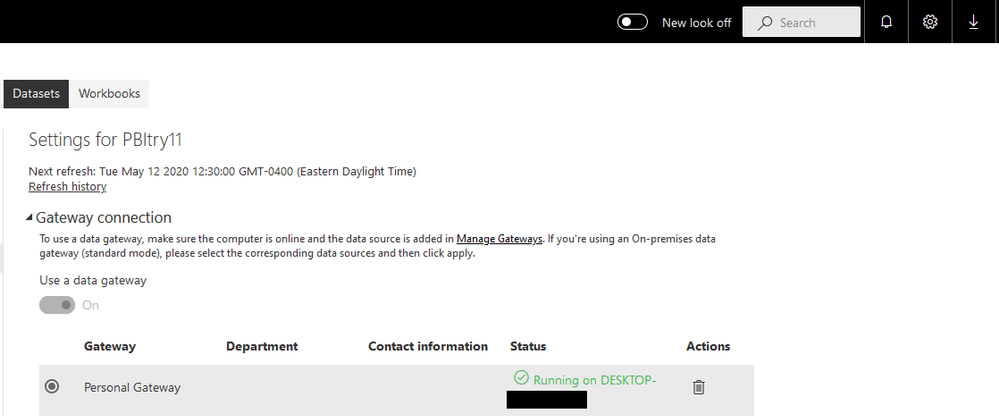
 

PBIworkingImage4.png


I'm not sure why this setup was causing me issues yesterday, but it appears the solution is to re-install/tinker with the Personal Gateway settings in order to resolve the issue.  To clarify, my custom connector is using OAuth authentication and the Web.Contents method to return JSON data from a REST API.  When the gateway is linked to the dataset and functioning properly, you should get an OAuth credential prompt when attempting to set up the "Data Source Credentials".


View solution in original post

1 REPLY 1
Anonymous
Not applicable

Update: Solved.


I was finally able to get this to work properly.  The "Query contains unknown function name" error is slightly misleading.  The actual issue is related to the personal gateway not being configured and linked to the PowerBI Service account correctly.


If you have the Personal Gateway downloaded and installed, make sure you sign in with your PowerBI account, verify that the Custom Connectors folder is correct and has correct permissions (if using the non-personal gateway).  Verify the Network Ports test under the Diagnostics tab as well.


PBIworking1.PNG


If the personal gateway is running correctly, you should see it appear in your PowerBI Service Data after you reopen the "Discover Data Sources" link under the error message.


PBIworkingImage4.png


I'm not sure why this setup was causing me issues yesterday, but it appears the solution is to re-install/tinker with the Personal Gateway settings in order to resolve the issue.  To clarify, my custom connector is using OAuth authentication and the Web.Contents method to return JSON data from a REST API.  When the gateway is linked to the dataset and functioning properly, you should get an OAuth credential prompt when attempting to set up the "Data Source Credentials".


Helpful resources

Announcements
May Power BI Update Carousel

Power BI Monthly Update - May 2026

Check out the May 2026 Power BI update to learn about new features.

Fabric SQL PBI Data Days

Data Days 2026 coming soon!

Sign up to receive a private message when registration opens and key events begin.

New to Fabric survey Carousel

New to Fabric Survey

If you have recently started exploring Fabric, we'd love to hear how it's going. Your feedback can help with product improvements.

Power BI DataViz World Championships carousel

Power BI DataViz World Championships - June 2026

A new Power BI DataViz World Championship is coming this June! Don't miss out on submitting your entry.