Don't miss your chance to take exam DP-600 or DP-700 on us!
Request nowLearn from the best! Meet the four finalists headed to the FINALS of the Power BI Dataviz World Championships! Register now
I was reading up on Power Apps and came across the following article
https://docs.microsoft.com/en-us/powerapps/maker/canvas-apps/powerapps-custom-visual
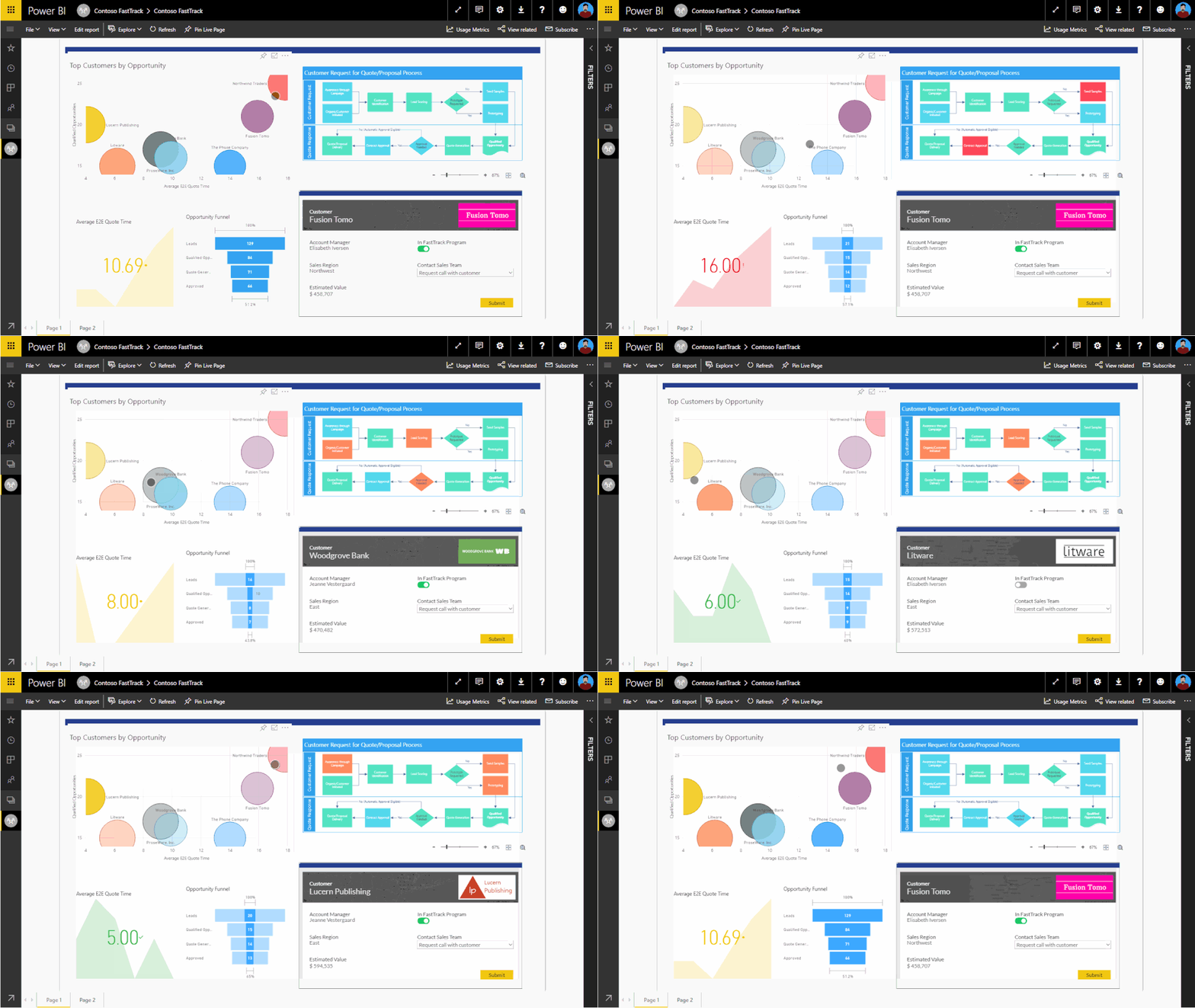
I noticed in the sample picture they showed in this article that there seemed to be a "Process Flow" diagram in the upper right hand corner that was being highlighted along with the data points selected. The lower right hand corner is a Power App
I find this super cool, and this is the first time I am seeing something like this - Does anyone know how this is done or what this visual is called?
Thanks in advance!
Solved! Go to Solution.
Thanks for noting the appsource
I actually found this
https://appsource.microsoft.com/en-us/product/power-bi-visuals/WA104381132?tab=Overview
Not sure if its the exact one as shown in the screen shot but I think its close enough!
I will give it a shot for now and will update if I find anything else in the future
Pretty cool stuff!
Hi, @rodneyc8063_1
It’s the first time I have seen such a visual.
The visual does not exist in the built-in visual library of PowerBI.
I suspect it may also be a PowerApp visual.
Best Regards,
Community Support Team _ Eason
Good to know its not something I missed that is a default out of the box visual.
I wonder if this is a custom visual?
Since its a screen shot from a Microsoft article I was hoping it was something "official" from Microsoft
Its pretty cool to be able to show the process flow as well
Hi, @rodneyc8063_1
Are you referring to the custom visuals in AppSource?Sorry, I also did not find any similar visualization here.
https://appsource.microsoft.com/en-us/marketplace/apps?product=power-bi-visuals
If you are a pro user, you can consider opening a support ticket with MSFT for consultation.
https://powerbi.microsoft.com/en-us/support/pro/
Best Regards,
Community Support Team _ Eason
Thanks for noting the appsource
I actually found this
https://appsource.microsoft.com/en-us/product/power-bi-visuals/WA104381132?tab=Overview
Not sure if its the exact one as shown in the screen shot but I think its close enough!
I will give it a shot for now and will update if I find anything else in the future
Pretty cool stuff!
Share feedback directly with Fabric product managers, participate in targeted research studies and influence the Fabric roadmap.
Check out the February 2026 Power BI update to learn about new features.
| User | Count |
|---|---|
| 20 | |
| 18 | |
| 11 | |
| 9 | |
| 7 |
| User | Count |
|---|---|
| 42 | |
| 38 | |
| 21 | |
| 19 | |
| 17 |